Table of Contents
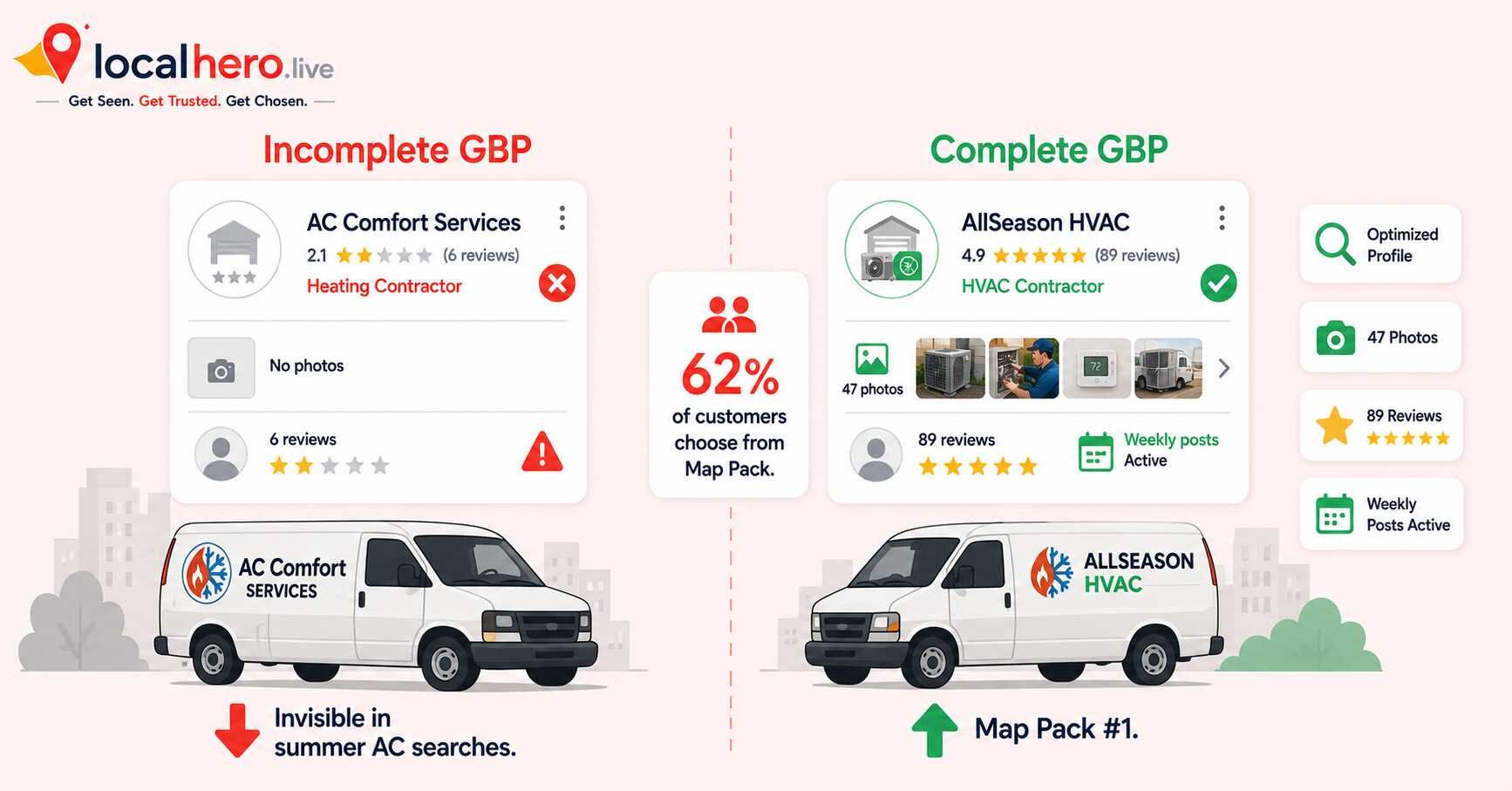
When an AC unit fails on a 100-degree July afternoon, the homeowner does not browse websites. They grab their phone, search "AC repair near me," and call the first HVAC company that shows up in the Map Pack. That call is worth $400 to $1,200. The company that answers it is the one that set up their Google Business Profile correctly.
Your HVAC Google Business Profile directly controls your Google Maps visibility. GBP signals account for 32% of local pack ranking weight, the single largest category in Google's local algorithm. Nothing moves Map Pack rankings faster than getting your profile right.
This guide covers every step of HVAC Google Business Profile setup, the right primary category, services, photos, seasonal posts, reviews, and the settings most HVAC companies ignore until competitors outrank them.
Why Your HVAC GBP Is Your Most Valuable Digital Asset
62% of HVAC customers choose from the Google Map Pack, the three listings at the top of local results before any website link. If you are not in those three spots, you are invisible before customers ever reach your site.
The average HVAC call is worth $850. Emergency calls run $400 to $1,200. A single Map Pack ranking for "AC repair near me" in a mid-size market generates 30 to 50 inbound calls per month during peak season, $25,000 to $42,000 in monthly opportunity from one free tool.
Businesses with complete profiles, detailed service listings, regular photo updates, and active review generation, receive 42% more direction requests and 35% higher click-through rates than competitors with basic listings.
Yet most HVAC companies treat their Google Business Profile as a one-time task. They set it up, add a phone number and address, and never return. 16% of HVAC companies have no photos at all on their profile, leaving Google Street View as the customer's first impression of their business.
For the full HVAC local SEO strategy this profile setup feeds into, see Local SEO for HVAC Companies: The Complete Guide.
The HVAC GBP Keyword Cluster Map
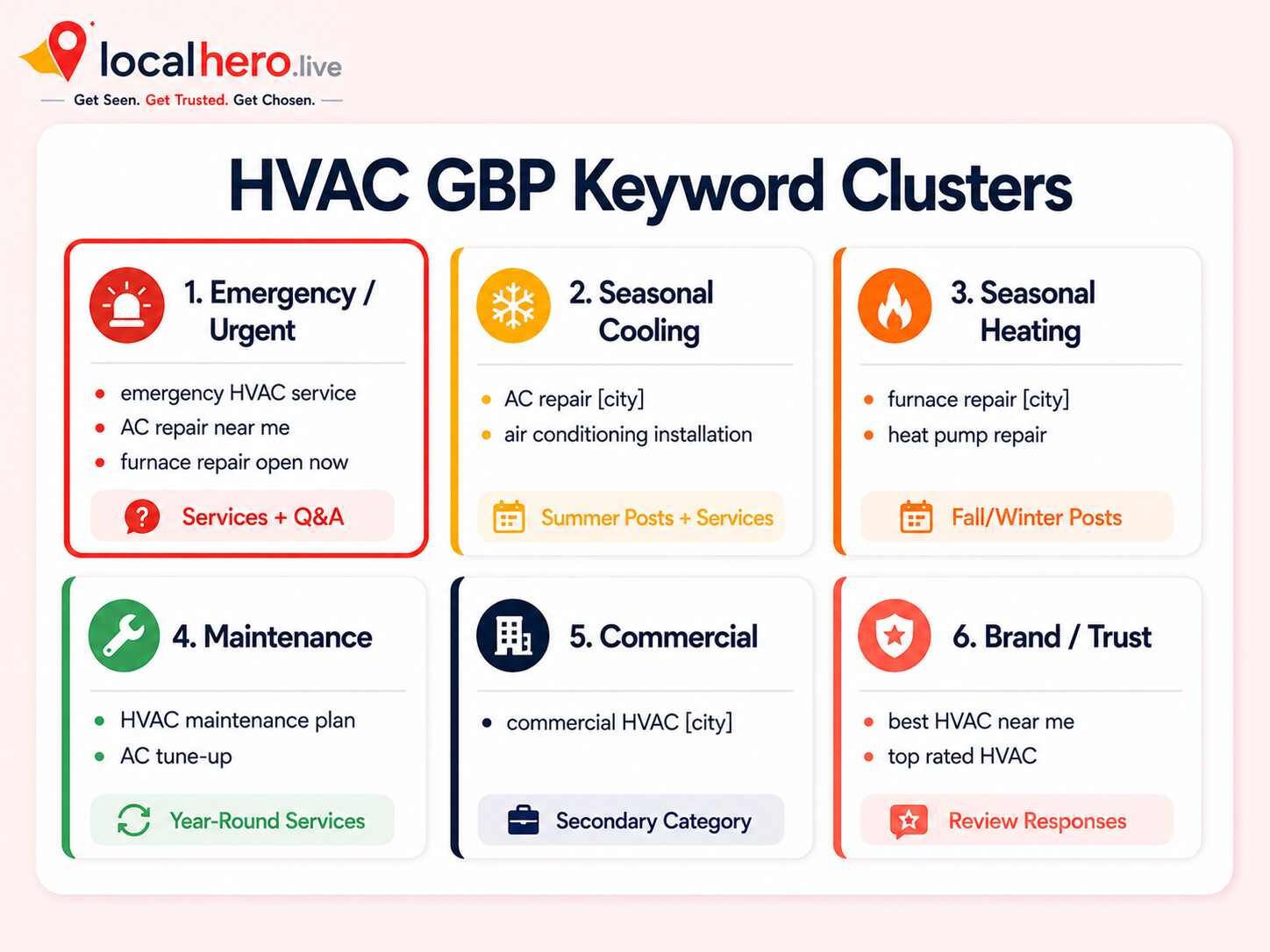
Before setting up your profile, map out the keyword clusters you are targeting. Your HVAC Google Business Profile should not target one keyword. It is the foundation for multiple search patterns that each convert differently.
|
Cluster |
Example searches |
Where it belongs on your GBP |
|---|---|---|
|
Emergency / urgent |
"emergency HVAC service," "AC repair near me," "furnace repair open now" |
Services section, business description, Q&A |
|
Seasonal cooling |
"AC repair [city]," "air conditioning installation," "AC tune-up near me" |
Summer Google Posts, photos, services |
|
Seasonal heating |
"furnace repair [city]," "heat pump repair," "heating service near me" |
Fall/winter Google Posts, photos, services |
|
Maintenance |
"HVAC maintenance plan," "AC tune-up," "furnace inspection near me" |
Year-round service entries |
|
Commercial |
"commercial HVAC [city]," "commercial air conditioning repair" |
Secondary category, commercial service entries |
|
Brand/trust |
"best HVAC company near me," "top rated HVAC [city]" |
Review responses, Q&A |
The emergency cluster converts fastest, that homeowner with a broken AC in July calls immediately. The seasonal clusters capture planned work. The maintenance cluster wins long-term contracts. Build every cluster into your profile from day one.
Use LocalHero's free local keyword generator to generate 50+ HVAC-specific keyword variations for your city in under a minute.
Step 1: Claim and Verify Your Profile
Go to business.google.com and sign in with your Google account. Search for your business name to see if a profile already exists. Google often auto-generates profiles from public business data, and these unverified profiles cause ranking problems.
If a profile exists, click "Claim this business." If not, click "Add your business to Google" and follow the setup flow.
Verification methods in 2026:
-
Video verification, record a short video showing your exterior signage and equipment. Now the most common method.
-
Postcard. Google mails a code. Takes 5-14 days.
-
Phone or email, available for some established businesses.
Complete verification before anything else. Unverified profiles cannot rank in the Map Pack.
Pro tip: Download LocalHero's free GBP optimization guide to work through every profile field in order. It includes setup templates specifically built for HVAC companies.
Step 2: Choose the Right Primary Category
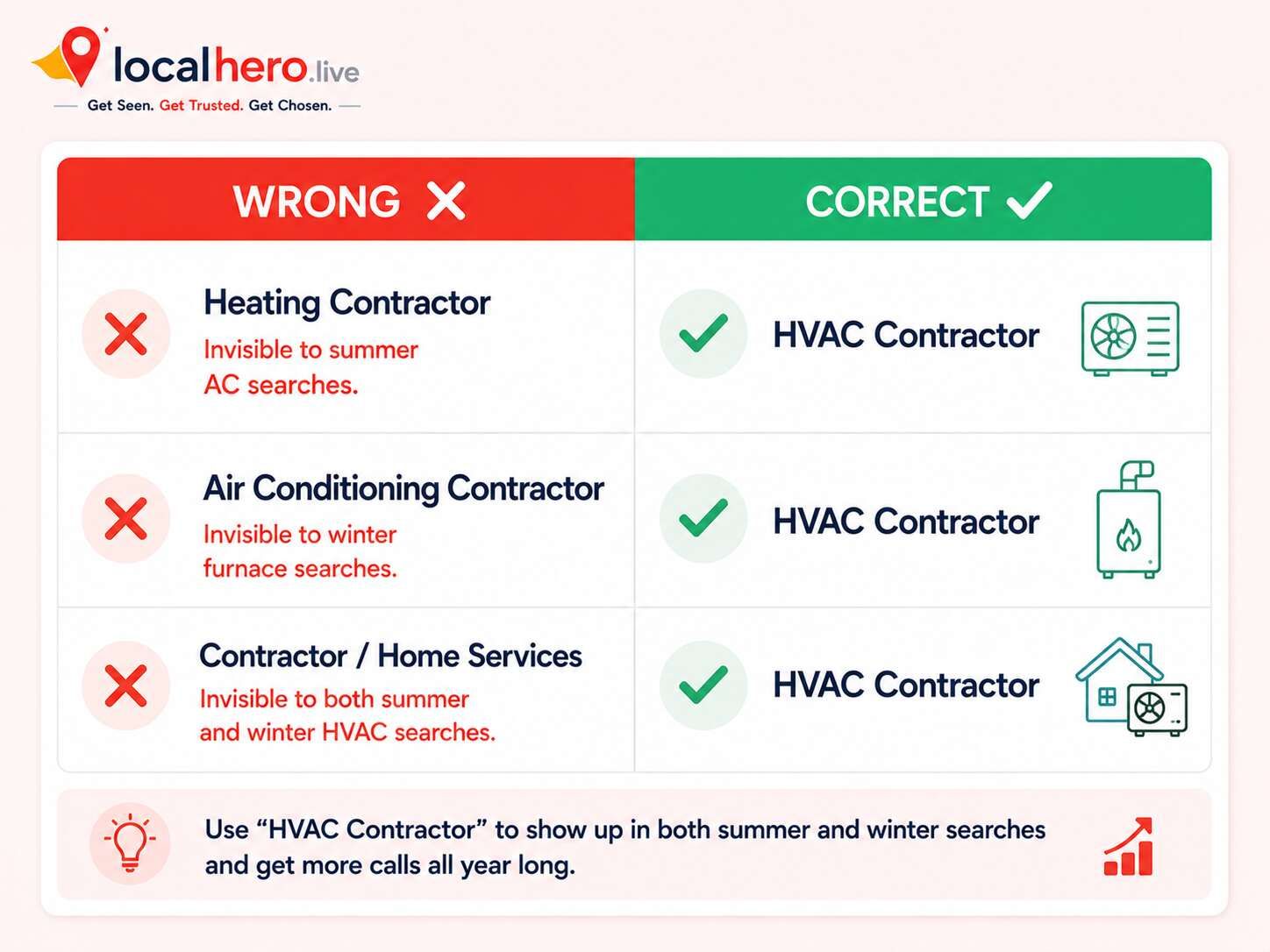
Your primary category is the single most important ranking signal in your entire profile. The primary category is the most influential GBP signal, it directly determines which searches Google matches your listing to.
For HVAC companies, the correct primary category is "HVAC Contractor."
Do not use:
-
"Heating Contractor", invisible to summer AC searches
-
"Air Conditioning Contractor", invisible to winter furnace searches
-
"Contractor" or "Home Services", too broad to rank for specific HVAC searches
After setting your primary category, add every relevant secondary category. Google allows up to 10. Relevant secondary categories for HVAC include:
-
Air Conditioning Contractor
-
Heating Contractor
-
Furnace Repair Service
-
Air Duct Cleaning Service
-
Commercial Refrigeration
-
HVAC Service (if available in your region)
Secondary categories expand which searches your profile matches without diluting your primary signal. Missing secondary categories means missing duct cleaning, commercial HVAC, and equipment-specific searches entirely.
Warning: Check your competitors' primary categories using a free browser extension like GMB Everywhere. If your top competitor uses "HVAC Contractor" and you are listed as "Heating Contractor," you are structurally invisible to half your market.
Step 3: Build Your Full Services Section
Your services section is a direct keyword-matching opportunity. Every service you list is a signal that Google uses to match your profile with specific searches. An HVAC company that lists "AC Repair," "Furnace Repair," and "Air Conditioning Installation" as separate services competes for all three searches independently.
Build your services section with individual entries for each service you offer:
Cooling: AC repair, AC installation, mini split installation, ductless AC repair, refrigerant recharge, air conditioning tune-up
Heating: Furnace repair, furnace installation, heat pump repair, heat pump installation, boiler repair, heating system tune-up
Maintenance + Air Quality: HVAC maintenance plan, AC tune-up, furnace inspection, duct cleaning, air purifier installation, humidifier installation
Commercial: Commercial HVAC repair, commercial AC installation, commercial heating service
Write 2-4 sentences for each service in natural language. "Our AC repair service covers refrigerant issues, compressor problems, and electrical failures, most repairs completed same day in [city]" is both customer-facing and keyword-rich.
Step 4: Set Your Service Area Correctly
Your HVAC Google Business Profile allows you to define a service area instead of showing a physical storefront address. Set this correctly, it directly affects which searches you are eligible to appear for based on the searcher's location.
Rules for setting your HVAC service area:
-
Add only cities you genuinely serve. Overextending to 30+ cities creates weak location signals without boosting rankings for any of them.
-
Stay within 30-40 miles of your dispatch location. Google prioritizes proximity, distant listings need stronger prominence signals to compensate.
-
List city + county. Adding both "Austin" and "Travis County" captures county-level searches.
-
Build location-specific service pages for your top cities. Your GBP service area sets eligibility, your website's location pages provide the supporting evidence Google needs to rank you there.
If you are not ranking outside your primary city, the gap is almost always service area pages, not your GBP settings. See Citation Building for Local SEO for the full approach.
Step 5: Upload Photos and Video Every Month
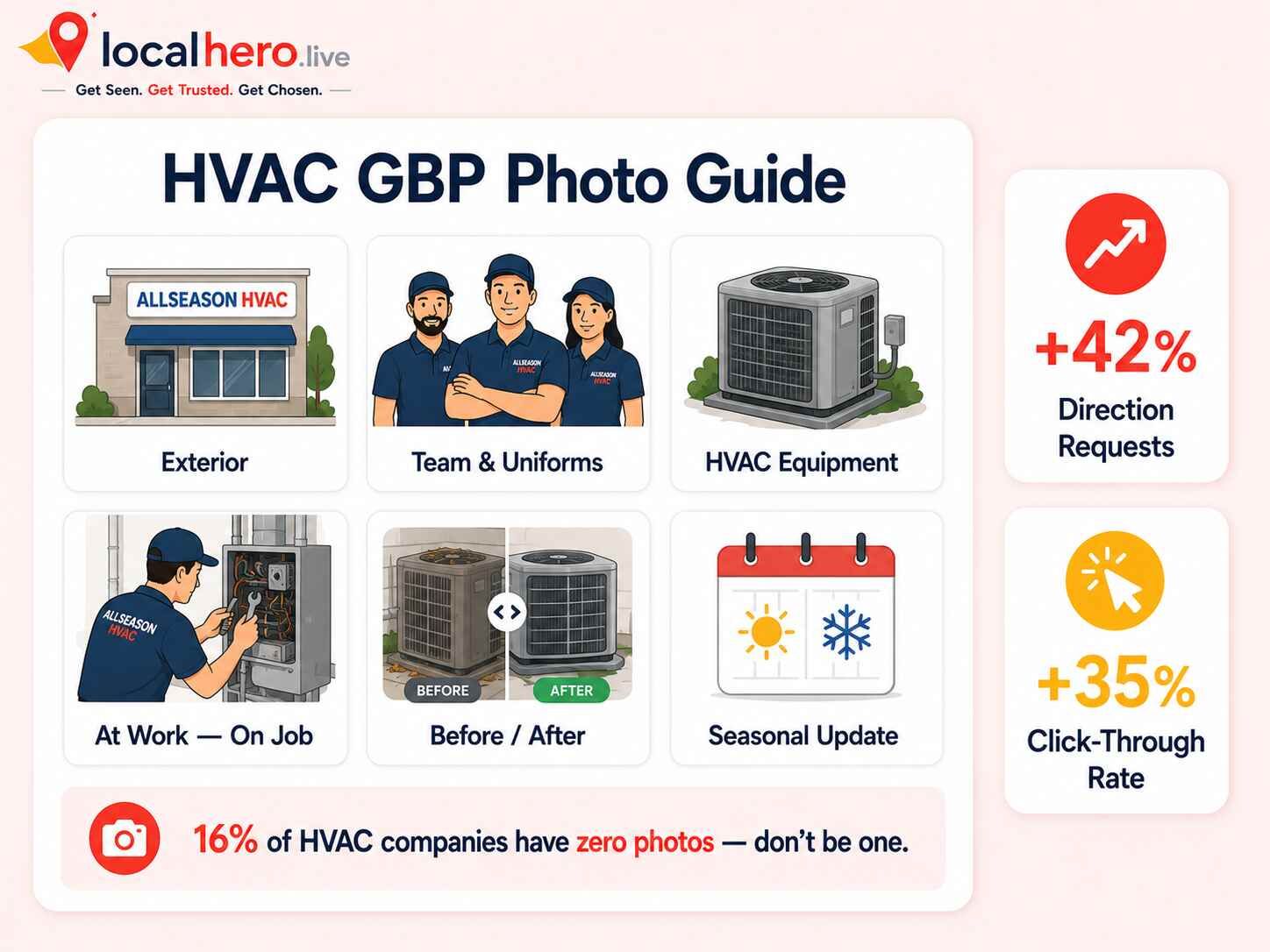
The average HVAC company has only 11 photos on their profile. Businesses with photos receive 42% more direction requests and 35% more website click-throughs. Photos are a trust signal before a customer ever reads a word of your profile.
Upload real photos in these categories:
-
Exterior: Your shop or warehouse with visible signage. Helps customers recognize and trust your business.
-
Team: Technicians in branded uniforms with vehicles. Builds personal trust for an in-home service.
-
At work: Technicians repairing or installing equipment on real jobs. Shows competence.
-
Equipment: The brands and types of systems you service. Customers often search for specific brands.
-
Before/after: Completed installations look dramatically better than a broken system.
-
Seasonal: Update photos for summer (AC units, cooling equipment) and winter (furnaces, heat pumps).
Add video in 2026. Google is pushing video harder than photos in 2026. A 60-90 second job video, a technician diagnosing and fixing a problem with a brief explanation, performs significantly better than static images alone. Record one job video per week for a month and rotate them through your profile.
Never use stock photos. Google can detect them and customers do not trust them.
Step 6: Post Seasonally, Before Demand Spikes
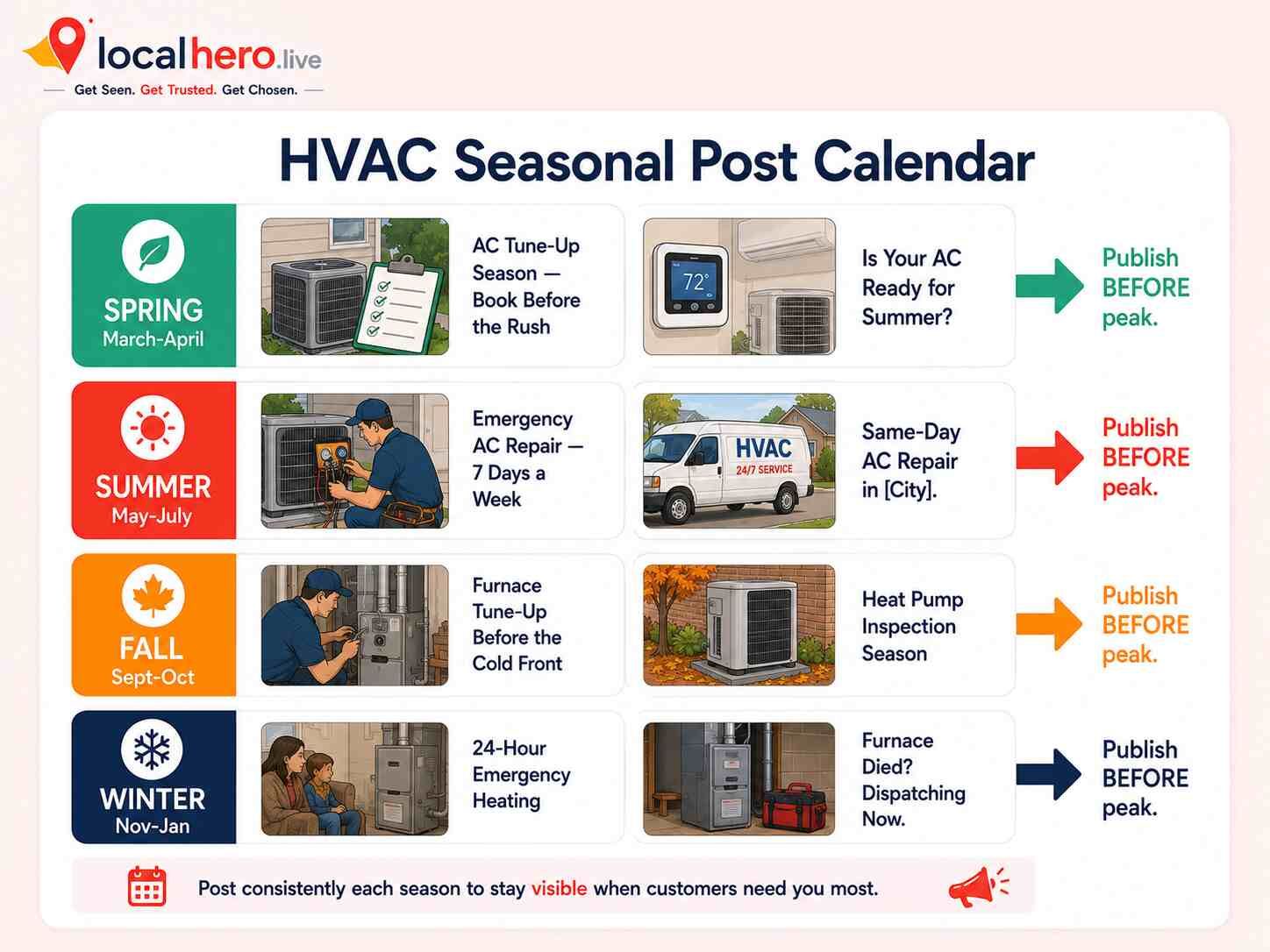
Google Posts are one of the most neglected features on any HVAC Google Business Profile. Seasonal posts tied to actual demand spikes and published before the demand hits outperform generic posts significantly. The HVAC calendar makes your content strategy obvious, you just have to execute it before the season arrives.
Spring (March-April): "AC Tune-Up Season Is Here, Book Before the Rush" / "Is Your Air Conditioner Ready for Summer?"
Summer (May-July): "Emergency AC Repair Available 7 Days a Week in [City]" / "Same-Day AC Repair, Call Before Noon, Fixed Today"
Fall (September-October): "Furnace Tune-Up Special, Book Before the First Cold Front" / "Heat Pump Inspection, Don't Get Caught in the Cold"
Winter (November-January): "24-Hour Emergency Heating in [City]" / "Furnace Died? Dispatching Now"
Each post needs a "Call now" CTA button and a real job photo. Publish at least once per week. A profile with no recent posts signals an inactive business to both Google and customers.
For full weekly post templates built for HVAC companies, see the GBP optimization guide.
Step 7: Build a Review System That Runs on Autopilot
Reviews influence both your Map Pack ranking and your conversion rate. In most HVAC markets, 40-80 reviews with a rating above 4.6 is enough to compete in the local pack. More important than the total is velocity, 15-20 reviews per month consistently outperform 200 reviews dumped in one week. Google values velocity and authenticity over raw count.
Here is the system that generates 15-20 HVAC reviews per month:
-
Text the customer within 2 hours of job completion, while satisfaction is highest.
-
Send one direct review link. Three taps maximum to complete.
-
Train dispatch staff to send the text before closing out the job ticket.
-
Respond to every review within 48 hours, positive and negative. Substantive review responses correlate with higher rankings.
-
Never offer incentives. Google's spam filters catch this and can suppress your reviews.
For professional review response scripts, use LocalHero's free review response generator, it writes non-generic, professional replies for any star rating in seconds.
LocalHero's review management service handles the full system, automated follow-up, response drafting, and velocity tracking for HVAC companies that want this managed.
Step 8: Activate Attributes and Q&A
Two features almost every HVAC Google Business Profile ignores, and both directly affect which searches your profile matches.
Attributes: In your GBP dashboard under "More," activate every relevant attribute:
-
24/7 emergency service
-
Weekend availability
-
Commercial service available
-
Financing available
-
Brands serviced (Carrier, Trane, Lennox, etc.)
Each attribute is an additional search-matching signal. "Emergency HVAC 24/7" directly supports your emergency keyword cluster.
Q&A Section: Add questions proactively before customers, or third parties, fill them in incorrectly:
-
"Do you offer 24-hour emergency HVAC service?"
-
"What HVAC brands do you service?"
-
"Do you offer financing?"
-
"How quickly can you dispatch a technician?"
-
"Do you service commercial systems?"
Monitor Q&A weekly, anyone can post an answer, including incorrect ones.
Common HVAC GBP Mistakes That Kill Rankings
These are the errors we see consistently across HVAC profiles that should be ranking but are not:
-
Wrong primary category. "Heating Contractor" makes you invisible to every summer AC search.
-
Vague services section. "HVAC Services" as one entry misses all specific searches.
-
No seasonal content. Summer photos in January signal an inactive profile.
-
No review responses. Unanswered reviews signal a disengaged business to both customers and Google.
-
Service area overextension. 50+ cities creates weak signals everywhere.
-
No photos. 16% of HVAC companies have zero photos, a direct competitive gift to rivals.
-
Ignoring Q&A. Third parties answer unanswered questions, sometimes with wrong information.
-
Skipping verification. Unverified profiles cannot rank in the Map Pack.
For a full audit of the most common GBP issues, see We Audited 50 Google Business Profiles, Here's What 80% Get Wrong.
Checklist: HVAC Google Business Profile Setup
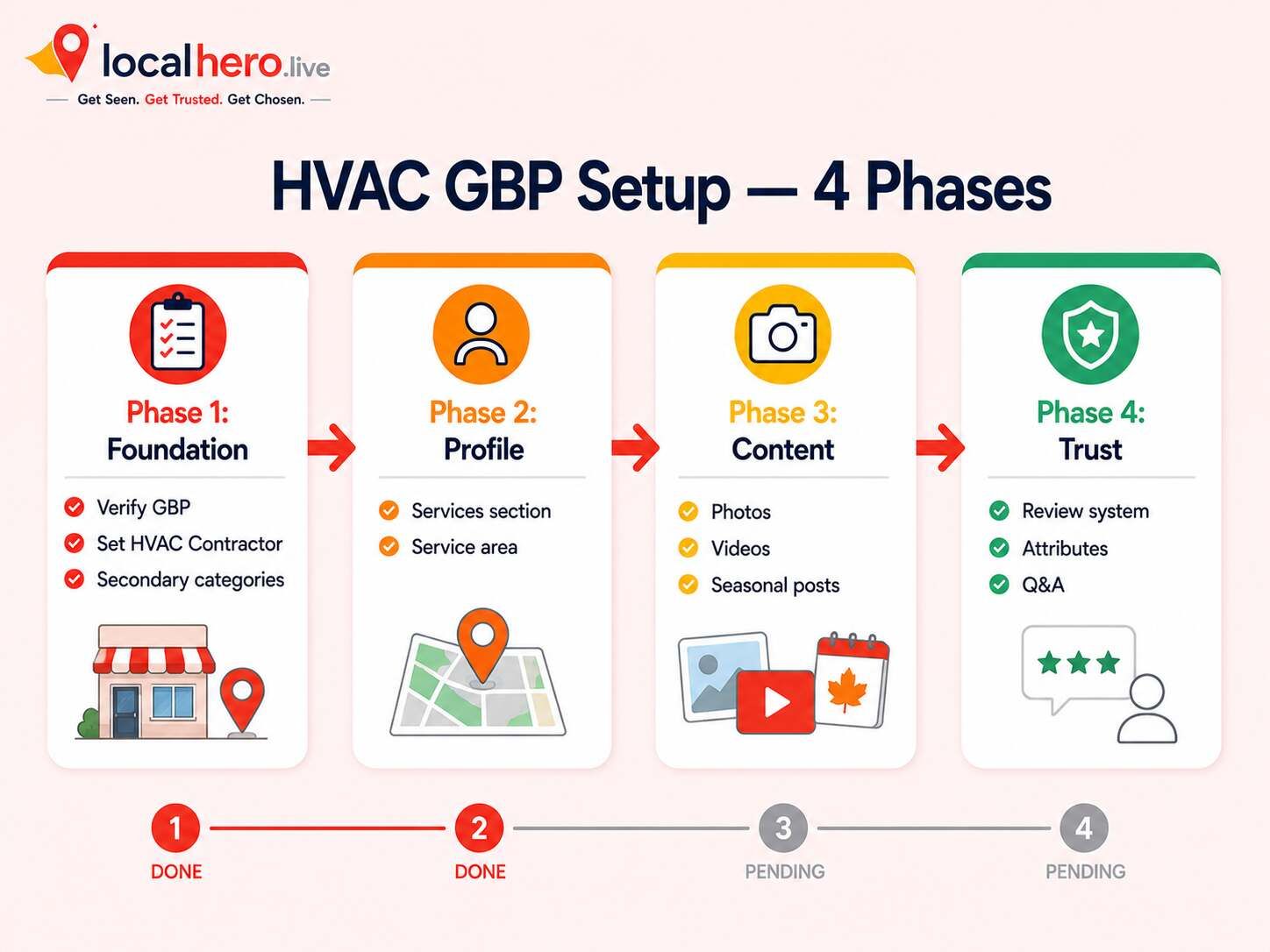
Use this to confirm every element is in place before moving to other local SEO work.
-
Claim and verify your profile at business.google.com.
-
Set primary category to "HVAC Contractor."
-
Add up to 10 secondary categories (Air Conditioning Contractor, Furnace Repair Service, Duct Cleaning, Commercial HVAC).
-
List every service individually with a 2-4 sentence description using your keyword clusters.
-
Set service area to only cities you genuinely serve within your dispatch radius.
-
Upload 20+ real photos: exterior, team, vehicles, at work, before/after, seasonal.
-
Add at least one 60-90 second job video and update monthly.
-
Schedule seasonal Google Posts for the next 90 days, publish at least weekly.
-
Set up a text-based review request system and target 15-20 new reviews per month.
-
Respond to every review within 48 hours using the free review response generator.
-
Activate all relevant attributes: emergency availability, commercial service, financing, brands serviced.
-
Populate Q&A with the 5 questions customers ask most before booking.
-
Run a free local SEO audit to score your profile across 17 signals.
Get a Free HVAC GBP Audit
Run an electrical crew too? See local SEO for electricians.
Not sure where your HVAC Google Business Profile stands against competitors in your market? A free local SEO audit from LocalHero will show you every gap in your profile and what it is costing you in calls.
We audit:
-
Primary and secondary category accuracy
-
Services section completeness and keyword alignment
-
Photo count, quality, and recency
-
Google Posts activity and seasonal timing
-
Review velocity, rating, and response rate
-
Attributes, Q&A, and website-to-GBP alignment
-
Competitor comparison against the top 3 HVAC companies in your market
-
AI search visibility across Google AI Overviews, ChatGPT, and Perplexity
AllSeason HVAC (Dallas) went from a working profile with no measurement system to +267% traffic and +143 new calls per month in 5 months. Full breakdown in the AllSeason HVAC case study.
Get your free HVAC GBP audit at localhero.live/contact
For managed HVAC GBP optimization, see LocalHero's Google Business Profile service and local SEO for HVAC.
Related reading
- Local SEO for HVAC Companies. The full campaign around the profile.
- HVAC SEO Case Study: Page 3 to the Map Pack. What this looked like for a real company.
- Google Business Profile Checklist. The general checklist this guide specialises.
- Local SEO Benchmarks 2026. HVAC had one of the widest review gaps between the top three and everyone else.
Related reading
- Cleaning Company SEO. The same profile work for cleaning companies, where the category choice differs.
Frequently Asked Questions
What is the correct primary category for an HVAC company on Google Business Profile?
The correct primary category is "HVAC Contractor." Do not use "Heating Contractor" — invisible to summer AC searches. Do not use "Air Conditioning Contractor" — invisible to winter furnace searches. "HVAC Contractor" signals to Google that you handle both. Add up to 10 secondary categories after setting your primary to capture specific service searches.
How do I set up my HVAC Google Business Profile from scratch?
Go to business.google.com and sign in with your Google account. Search for your business name first — Google may have auto-generated a profile. If a profile exists, claim it. If not, click "Add your business to Google" and follow the flow. Complete video verification when prompted. Then work through every field: primary category ("HVAC Contractor"), services section, service area, photos, business description, attributes, and Q&A. Do not skip verification — unverified profiles cannot rank in the Map Pack.
How many Google reviews does an HVAC company need to rank on Google Maps?
In most markets, 40-80 reviews above 4.6 stars is enough to compete in the Map Pack. Review velocity matters more than total count — 15-20 new reviews per month consistently outperforms 200 reviews that all arrived at once. Google rewards recency and a steady flow of fresh reviews. Set up an automated text-based review request system to send a direct review link within 2 hours of every completed job.
Should HVAC companies post seasonally on Google Business Profile?
Yes — and the timing matters. The most effective HVAC Google Posts are published before the demand spike, not during it. Post AC tune-up content in March and April before summer demand hits. Post furnace inspection content in September and October before the first cold front. Emergency service posts should run year-round. A profile with consistent seasonal posts signals an active, well-managed business to both Google and customers.
How does Google Business Profile affect HVAC Map Pack rankings?
GBP signals account for 32% of local pack ranking weight — the largest single factor in Google's local algorithm. Your primary category determines which searches you match. Your services section determines which specific queries you rank for. Your review velocity and response rate affect your prominence score. Your photo activity and posting frequency signal that your business is active. Every element works together — which is why the setup order in this guide matters.
Md Shakil Jamal
Co-Founder | Digital Marketing Manager and DEV
Md Shakil Jamal is the co-founder of LocalHero and an SEO content strategist. He helps local businesses rank higher on Google, appear in AI search results, and turn online visibility into business growth. Connect with him on LinkedIn.
More local SEO playbooks
Ready to be the local hero in your city?
Get a free local SEO audit of your site, Google Business Profile, citations, and top three Map Pack competitors. You will see exactly where you can win in 30 seconds.
- No long term contracts
- No lock in
- Cancel anytime