Why Your GBP Isn't Showing Up: 12 Reasons and Fixes
Table of Contents
You claimed your Google Business Profile. You filled in your address, hours, and phone number. Everything looks good on your end.
But when you search for your business on Google, nothing. No Map Pack. No Knowledge Panel. No sign that your GBP even exists.
This is one of the most frustrating problems local business owners face. And you are not alone. Thousands of businesses deal with invisible GBP listings every single day.
The good news? In almost every case, there is a clear reason why your GBP is not showing up. And in this guide, we will walk you through every single one, plus exactly how to fix it.
Whether you run a plumbing company, a dental office, a law firm, or any other local service business, this guide will help you get visible on Google Maps and local search again.
What Does "GBP Not Showing Up" Actually Mean?
Before we dig into fixes, let us clarify what "not showing up" actually means. Because the problem can look different depending on your situation.
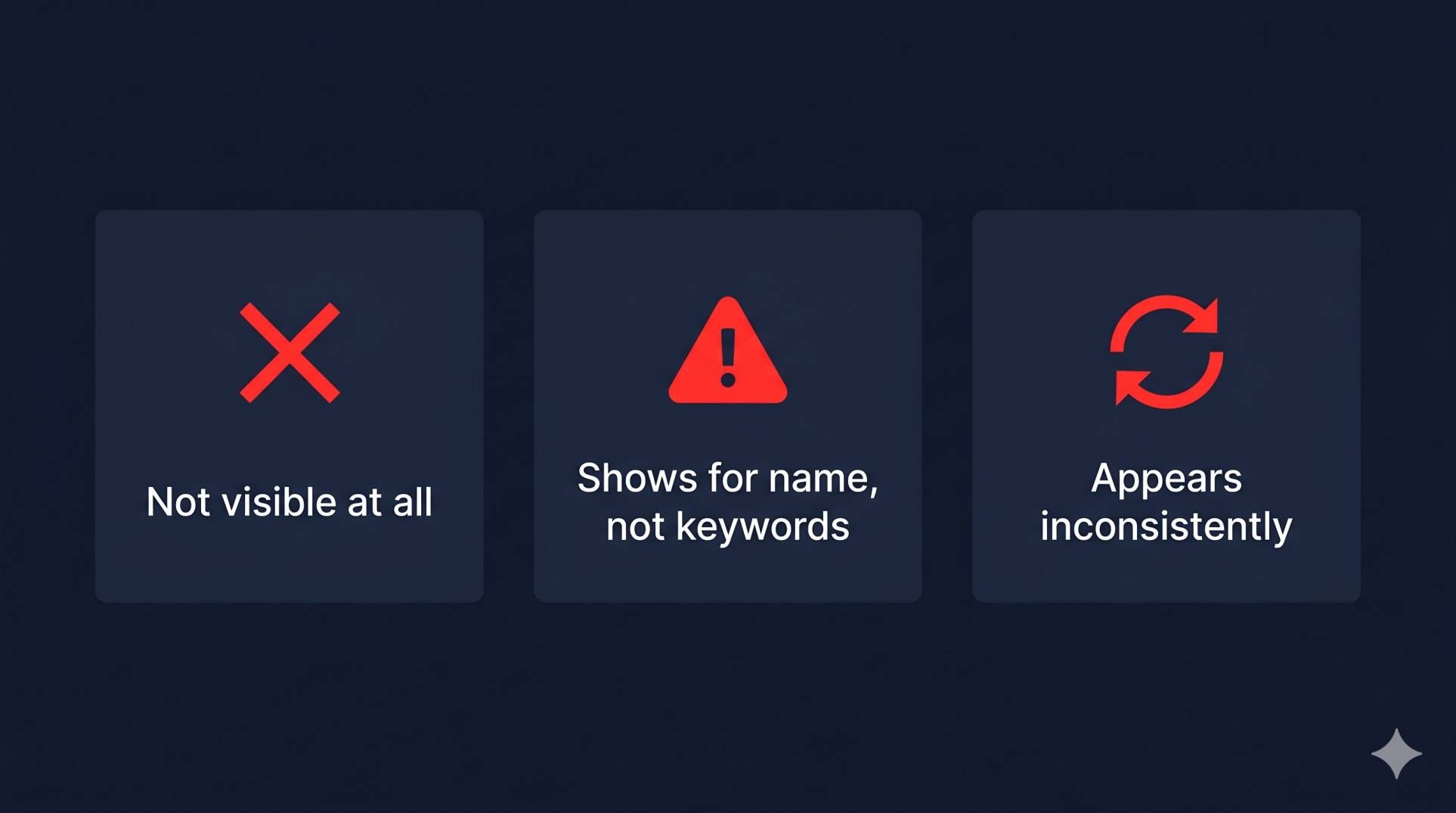
There are three common versions of this problem.
Version 1: Your GBP does not appear at all. You search your exact business name on Google and nothing comes up. No Knowledge Panel on the right. No Map Pack result. This is the most serious version.
Version 2: Your GBP appears for your business name, but not for service keywords. You can find your listing when you type "Smith's Plumbing", but when you type "plumber near me" or "emergency plumber Austin TX," you are nowhere. This is a ranking and relevance problem.
Version 3: Your GBP appears sometimes, but not consistently. It shows up when you search from one location but disappears from another. Or it appeared last week but is gone now. This usually points to filtering, distance issues, or a temporary Google glitch.
Each of these has different causes. This guide covers all of them. Now let us look at the 12 most common reasons and how to fix each one.
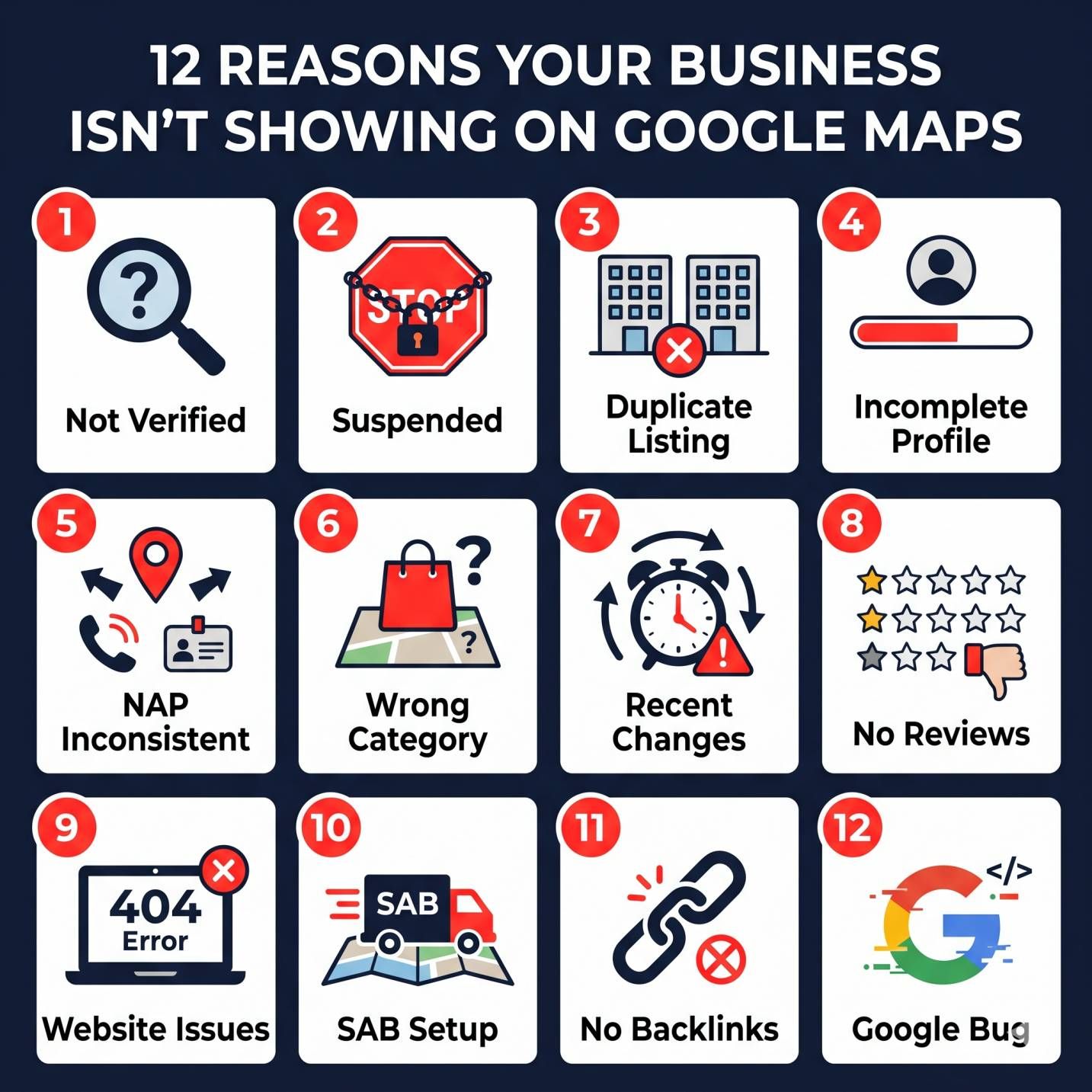
Reason 1: Your Profile Is Not Verified
This is the number one reason a Google Business Profile does not show up in search results. If your profile is not verified, Google will not display it to the public.
Verification is how Google confirms that you actually own or manage the business. Without it, your listing is essentially invisible.
How to check: Log into your Google Business Profile Manager. Look for a blue checkmark or a "Verified" status next to your business name. If you see "Verify now" or "Pending verification," that is your problem.
How to fix it:
-
Log into your Google Business Profile dashboard
-
Click the "Verify" or "Get verified" button
-
Choose a verification method, in 2026, the most common options are video verification, phone call, postcard by mail, or email
-
Complete the verification steps within the required timeframe
-
Wait 3 to 5 business days for your profile to go live after verification
Video verification has become the default for most new listings. Google will ask you to show your business signage, your interior space, and proof that you operate at the listed address. Film a single continuous video. Do not cut or edit it.
Pro tip: Use a business email connected to your domain (like info@yourbusiness.com) rather than a personal Gmail address. This signals legitimacy and can speed up the process.
Reason 2: Your GBP Has Been Suspended
A suspended GBP will disappear from Google Search and Maps completely. Google suspends profiles that violate its guidelines, and sometimes it suspends profiles by mistake.
Common reasons for suspension include keyword stuffing in your business name (like calling yourself "Best Plumber Austin TX | Smith's Plumbing" instead of just "Smith's Plumbing"), using a virtual office or PO Box address, operating a lead-generation business that does not serve customers directly, or receiving multiple spam reports from competitors.
How to check: Log into your Business Profile dashboard. If your listing is suspended, you will see a red "Suspended" notice.
How to fix it:
-
Fix any violations, especially your business name and address
-
Submit a reinstatement request through the Google Business Profile Help forum
-
Include supporting documents like utility bills, business licenses, or tax documents
-
Wait for Google's review, which can take 3 to 7 business days
Suspensions are stressful, but most are fixable if you follow the reinstatement process properly and the violation was not intentional.
Reason 3: You Have a Duplicate Listing
Duplicate listings are more common than you think. Google sometimes creates automatic listings based on web data. A previous owner might have claimed a profile for the same address. Or you might have accidentally created two profiles yourself.
When Google detects duplicates, it often filters one out, and it may not be the one you want.
How to check: Search your business name, phone number, and address on Google Maps. Look for any listings that are similar but not identical. Check for slight name variations or old phone numbers.
How to fix it:
-
Identify the duplicate listing on Google Maps
-
Click "Suggest an edit" on the duplicate listing
-
Select "Close or remove" and then "Duplicate"
-
If the duplicate has a different owner, contact Google Support directly
-
Monitor the situation. It can take a few weeks for Google to process the removal
Getting the duplicate removed often restores visibility to your real listing within days.
Reason 4: Your Business Information Is Incomplete
Google rewards complete profiles with higher visibility. An incomplete profile, one missing services, business hours, a website link, categories, or a description, sends a signal to Google that the business may not be active or trustworthy.
Think about it from Google's perspective. Would you rather show a searcher a business with a full profile, 50 photos, and detailed service descriptions? Or a profile with just a name and phone number?
How to fix it:
-
Fill out every single field in your GBP dashboard, no exceptions
-
Add your primary and secondary business categories
-
Write a complete business description using relevant keywords naturally
-
List all your services with descriptions and pricing if applicable
-
Add your service area if you go to customers
-
Upload at least 10 to 15 high-quality photos (storefront, team, work examples)
-
Set your business hours, including special holiday hours
-
Add your website URL and appointment link
Aim for 100% profile completeness. Google has confirmed that complete profiles are more likely to appear in local search results than incomplete ones.
Reason 5: Your NAP Is Inconsistent Across the Web
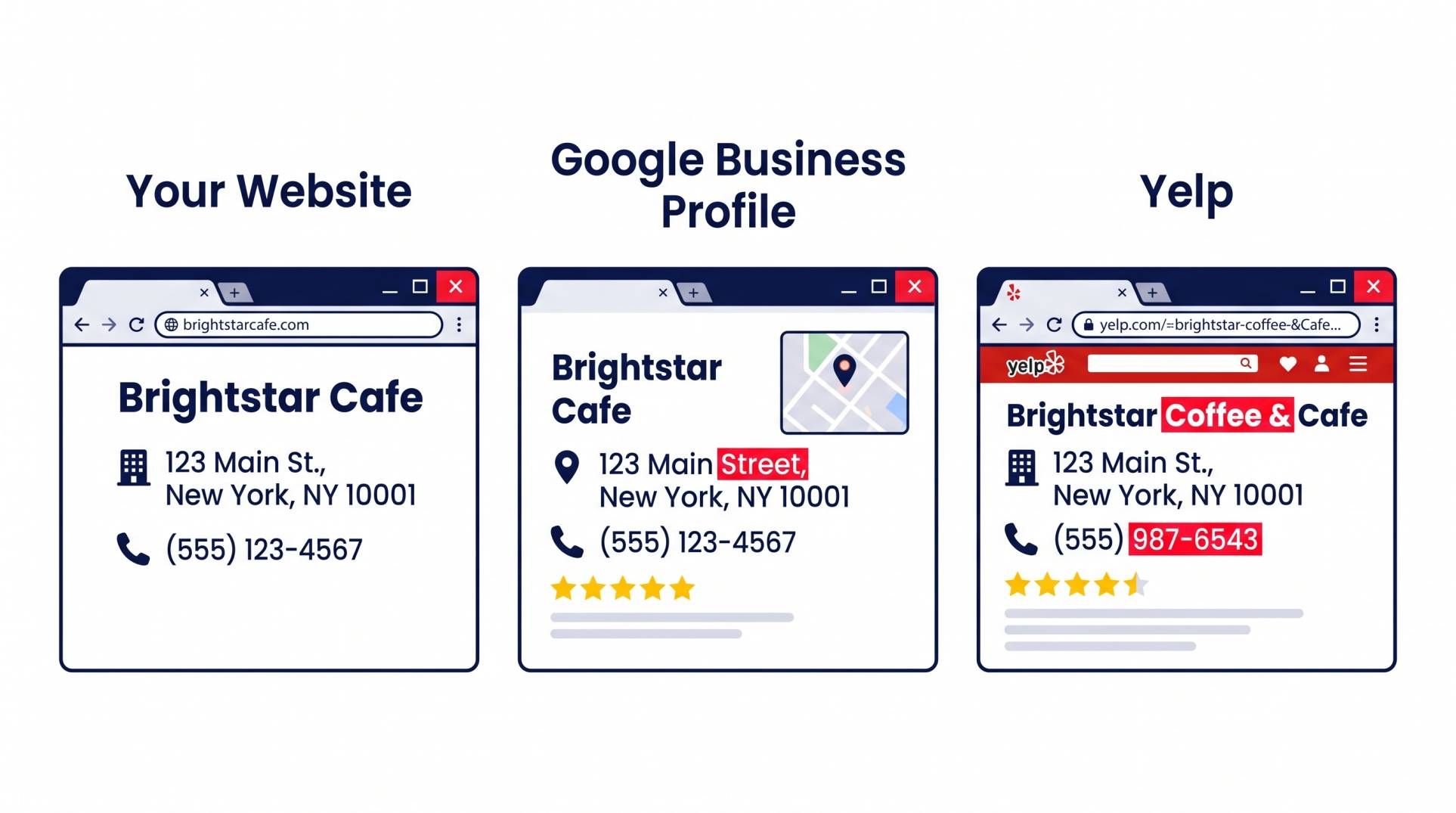
NAP stands for Name, Address, and Phone Number. It is the foundation of local SEO. If your NAP information is different across your website, your GBP, your social media profiles, and online directories, Google gets confused.
Even small differences matter. "123 Main Street" versus "123 Main St." or "Suite 200" versus "#200", these inconsistencies can hurt your visibility.
How to fix it:
-
Choose one exact format for your business name, address, and phone number
-
Update your website header, footer, and contact page to match
-
Update your GBP to match exactly
-
Audit your listings on Yelp, Facebook, Yellow Pages, BBB, and industry-specific directories
NAP consistency is one of the strongest trust signals Google uses for local rankings. A business with perfect NAP consistency across 50+ directories will almost always outrank a competitor with messy, conflicting information.
Reason 6: You Picked the Wrong Primary Category
Your primary category is one of the most powerful ranking signals in your Google Business Profile. It tells Google exactly what kind of business you are and what searches you should appear for.
If you pick the wrong one, you will not show up for the right searches. Period.
For example, if you are a plumber and your primary category is set to "Contractor" instead of "Plumber," you will rank for contractor-related searches instead of plumbing searches. That is a huge miss.
How to fix it:
-
Go to your GBP dashboard and check your primary category
-
Search for your main service keyword on Google Maps (like "plumber near me")
-
Look at the top 3 businesses in the Map Pack, what primary categories are they using?
-
Match your primary category to the one that best describes your core business
-
Add 3 to 5 secondary categories that cover your other services
Do not add categories that do not apply to your business. Google penalizes category stuffing. Stick to categories that accurately describe what you do.
Reason 7: You Recently Made Big Changes
Google takes time to process changes. If you recently updated your business name, address, phone number, categories, or other major details, it can take Google up to 3 to 5 days to reflect those changes.
During this processing period, your profile might temporarily disappear from search results or show outdated information.
How to fix it:
-
If you made changes less than a week ago, wait. Google needs time
-
Do not make additional changes while Google is processing. It can extend the delay
-
After 5 business days, check again. If the problem persists, contact Google Support
-
Keep a log of what you changed and when, so you can reference it if needed
The key here is patience. Many business owners panic and start making more changes, which only makes the problem worse.
Reason 8: Your Profile Has Zero Reviews
Reviews are a major local ranking factor. A profile with zero reviews looks untrustworthy to both Google and potential customers.
While having no reviews will not make your profile completely invisible, it makes it extremely unlikely to appear in competitive local searches. Google prefers to show businesses that other people have validated with reviews.
How to fix it:
-
Ask your most loyal customers to leave a Google review, start with 5 to 10 people you trust
-
Create a direct review link (you can find this in your GBP dashboard under "Ask for reviews")
-
Send the link via email or text after every completed job
-
Respond to every single review, both positive and negative
-
Never buy fake reviews. Google detects them, and the penalty is severe
Aim for a steady flow of new reviews every month. Businesses with 20+ reviews and a 4.0+ rating are significantly more likely to appear in the Map Pack.
For a complete strategy on managing reviews, check out our review management service.
Reason 9: Your Website Has Technical SEO Problems
Your GBP does not exist in isolation. Google also looks at your website to determine your local relevance and authority. If your website has serious technical SEO issues, it can drag down your GBP visibility too.
Common problems include slow page speed, no mobile-friendly design, broken links, missing or duplicate title tags, no local schema markup, and thin content with no location-specific keywords.
How to fix it:
-
Run your site through Google PageSpeed Insights and fix anything below 50
-
Make sure your website is fully mobile-responsive
-
Add LocalBusiness schema markup with your NAP, hours, and service area
-
Create location-specific landing pages if you serve multiple cities
-
Fix broken links and redirect old pages properly
-
Make sure Google can crawl and index your site, check in Google Search Console
Your website and your GBP work together. When both are optimized, they amplify each other. When one is broken, both suffer.
Need help with your on-page SEO? Check out our site optimization service.
Reason 10: You Are a Service-Area Business With Hidden Address
If you are a service-area business (SAB), meaning you go to your customers instead of them coming to you, your address is hidden on your profile. This is correct and follows Google's guidelines.
But SABs often face extra visibility challenges. Without a visible address, Google relies more heavily on other signals to determine where to show your listing. And SABs are more likely to be filtered out in the Map Pack, especially in highly competitive markets.
How to fix it:
-
Make sure your service areas are accurately defined in your GBP settings
-
Do not set your service area too wide, focus on cities and zip codes you actually serve
-
Build citations and backlinks that mention your service areas
-
Create location-specific pages on your website for each city you serve
-
Get reviews from customers in different service areas, this helps Google associate you with those locations
SABs need to work harder on off-profile signals like citations, backlinks, and localized content. Your GBP alone is not enough.
Reason 11: You Have No Local Backlinks or Citations
Backlinks and citations are how Google validates that your business is real, relevant, and trusted in your local market. A citation is any mention of your business name, address, and phone number on another website. A backlink is a link from another website pointing to yours.
If your business has very few citations and zero local backlinks, Google has little external evidence that you are a legitimate local business. And that means your GBP is less likely to appear in competitive searches.
How to fix it:
-
Submit your business to the top 50 general directories (Yelp, BBB, Yellow Pages, Foursquare, etc.)
-
Find industry-specific directories for your niche and get listed
-
Get featured in local news sites, community blogs, or local business associations
-
Sponsor local events, charities, or sports teams for natural backlink opportunities
-
Create shareable local content that other sites want to link to
Building local authority takes time, but it is one of the most powerful ways to improve your GBP visibility. Businesses with strong local backlink profiles consistently dominate the Map Pack.
Learn more about our authority backlinks service to see how we build real, relevant local links for businesses like yours.
Reason 12: A Google Bug or Outage Is Affecting Your Listing
Sometimes the problem is not you. It is Google.
Google's systems are massive and complex. Bugs, glitches, and outages happen more often than most people realize. In April 2025, Google Business Profile posts disappeared worldwide for several days. Businesses could still publish posts from their dashboard, but the posts were invisible to the public.
Similar bugs have caused phone numbers to disappear, hours to reset, and entire listings to drop from search results without any changes from the business owner.
How to check:
-
Search for "Google Business Profile outage" or "GBP bug" on X (Twitter) or local SEO forums
-
Check the Google Business Profile Help Community for similar reports
-
If many other businesses are reporting the same issue, it is likely a Google-side problem
How to fix it:
-
Do not panic or make changes to your profile during a known outage
-
Document the issue with screenshots and dates
-
Wait 48 to 72 hours for Google to resolve the issue
-
If the problem persists after a week, contact Google Support directly
It is frustrating when the problem is out of your hands. But knowing that it is a Google bug, not something you broke, saves you from making unnecessary changes that could cause new problems.
The Complete GBP Visibility Checklist
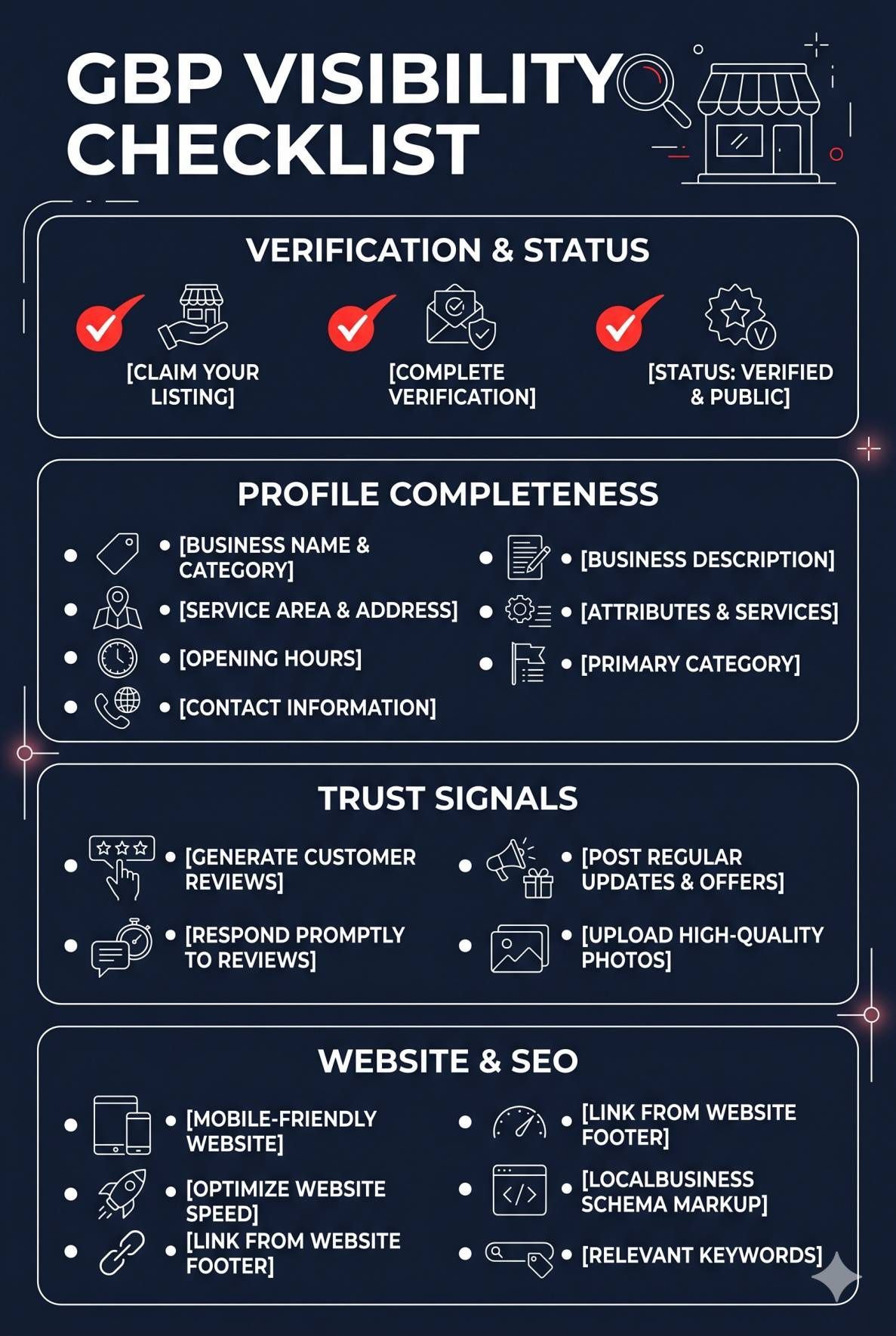
Use this checklist to audit your own Google Business Profile. Work through each item in order.
Verification and Status:
✅ Profile is verified (blue checkmark visible in dashboard)
✅ No suspension notices or warnings
✅ No duplicate listings exist on Google Maps
Profile Completeness:
4. ✅ Correct primary category selected
5. ✅ 3 to 5 relevant secondary categories added
6. ✅ Full business description with target keywords
7. ✅ All services listed with descriptions
8. ✅ Accurate business hours and special hours set
9. ✅ Website URL and appointment link added
10 .✅ 15+ high-quality photos uploaded
Trust Signals:
11. ✅ 10+ Google reviews with 4.0+ average rating
12. ✅ All reviews responded to within 48 hours
13. ✅ NAP consistent across website, GBP, and all directories
14. ✅ 50+ accurate citations on major directories
Website and SEO:
15. ✅ Website loads in under 3 seconds on mobile
16. ✅ LocalBusiness schema markup implemented
17. ✅ Location-specific pages created for each service area
18. ✅ Google Search Console set up and monitored
19. ✅ Local backlinks from relevant, authoritative sites
Ongoing Maintenance:
20. ✅ New GBP posts published weekly
21. ✅ Photos added monthly
22. ✅ Reviews requested after every completed job
23. ✅ Profile information reviewed quarterly for accuracy
Print this checklist. Work through it. Every item you complete brings you one step closer to showing up in the Map Pack.
Real Example: How a Denver Dental Practice Got Back on Google Maps
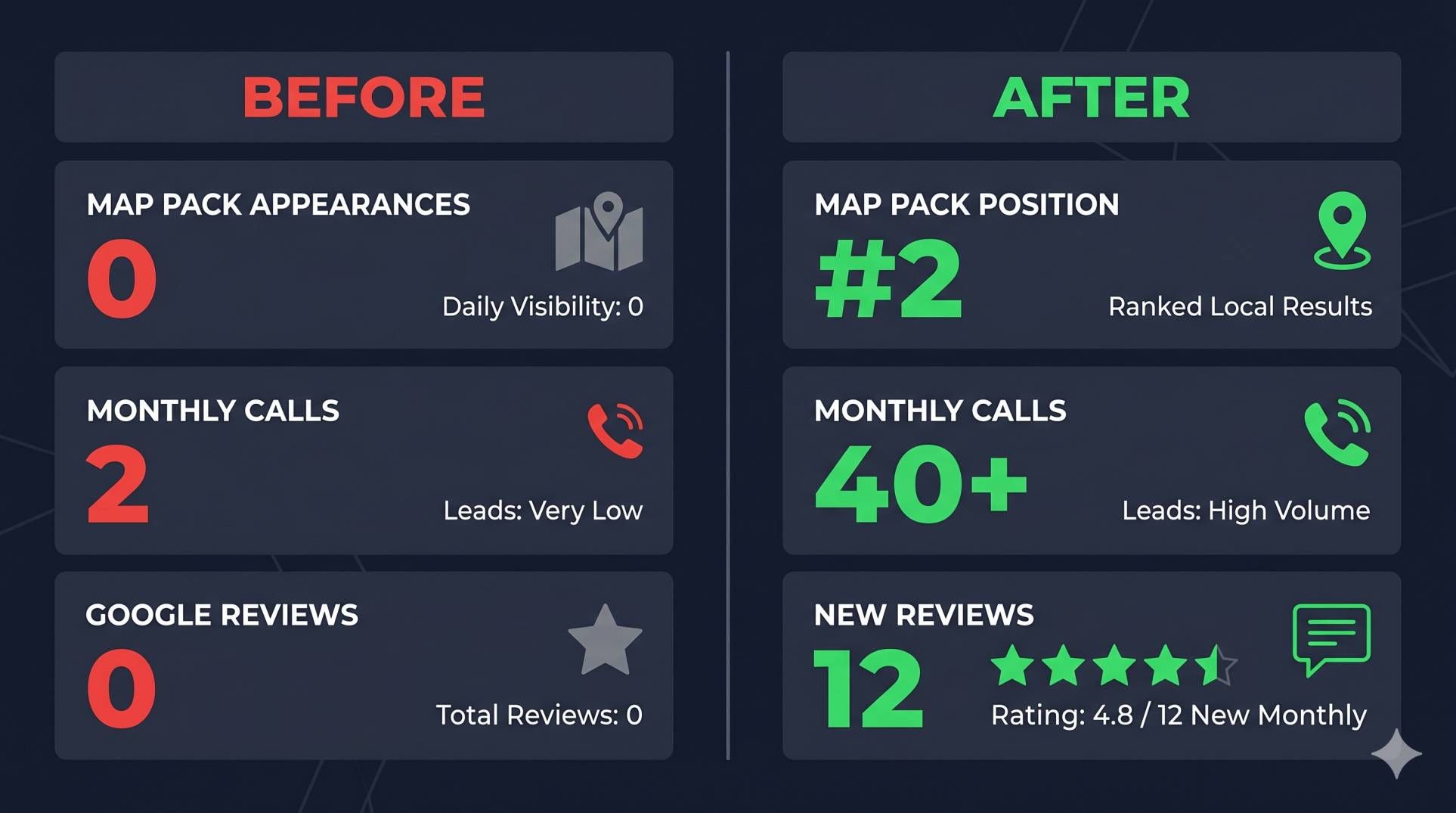
Here is a real-world example of how one business fixed their invisible GBP.
A family dental practice in Denver, CO, came to us after their Google Business Profile stopped appearing in local search. They had been getting steady calls from Google Maps for over a year. Then one month, the calls dropped to almost zero.
Here is what we found during our audit:
Problem 1: Duplicate listing. A previous dentist who practiced at the same address had an old, unclaimed GBP. Google was filtering the new practice's listing as a duplicate.
Problem 2: NAP inconsistency. The practice had moved suites within the same building. Their website said "Suite 210" but their GBP still said "Suite 105." Fifteen directory listings had the old address.
Problem 3: Wrong primary category. Their primary category was set to "Dental Clinic" instead of "Dentist." This mismatch meant they were not ranking for "dentist near me" searches.
What we did:
-
Removed the duplicate listing through Google's suggest-an-edit process
-
Updated the address across the GBP, website, and all 15 directory listings
-
Changed the primary category to "Dentist" and added "Cosmetic Dentist" and "Pediatric Dentist" as secondary categories
-
Built 30 new citations with the correct NAP
-
Implemented a review request system that generated 12 new reviews in the first month
The result: Within 6 weeks, the practice was back in the Map Pack for "dentist Denver" and "family dentist near me." Monthly calls from Google Maps went from near-zero to over 40. That is the power of diagnosing and fixing the right issues.
Stop Guessing, Get a Free GBP Audit
If your Google Business Profile is not showing up, you do not have to figure it out alone.
At LocalHero, we help local service businesses get visible on Google Maps and stay visible. Our team has fixed hundreds of invisible, suspended, and underperforming GBP listings for businesses across the United States.
Here is what you get with our free audit:
-
A full diagnosis of why your GBP is not appearing
-
A NAP consistency check across your top directory listings
-
A review of your primary and secondary categories
-
Competitor comparison showing where you stand in your local market
-
A custom action plan with prioritized fixes
No sales pitch. No commitment. Just a clear picture of what is wrong and how to fix it.
👉 Request your free GBP audit now
Or explore our full suite of local SEO services to see how we help businesses like yours rank higher, build trust, and get chosen.
Is Your Listing Suppressed, or Just Not Ranking?
There is a real difference between a Google Business Profile that ranks poorly and one that Google has suppressed. Ranking poorly means your profile is live and eligible, but weak signals keep it out of the Map Pack. Suppression means Google has decided your listing violates its guidelines and is hiding it from search and Maps entirely, even for a search of your exact business name.
Google typically suppresses a listing for one of these reasons:
- Address does not match a real, staffed location. A virtual office, UPS Store mailbox, or an address you do not actually operate from will get flagged, especially for service-area businesses that accidentally show a public address.
- Business name includes a keyword that is not part of your legal or DBA name. "Joe's Plumbing - Emergency 24/7 Drain Cleaning" as your listed business name is a guideline violation, not a keyword strategy.
- Wrong or overly broad category. Listing a specialty plumbing business as "Contractor" or a dental practice as "Doctor" can trigger a review, especially if paired with other flags.
- Duplicate listings for the same location. If your business has two or more active profiles at the same address, Google will often suppress all but one, and sometimes suppresses the wrong one.
- A spam report from a competitor or customer. Anyone can flag a listing through Google Maps. Most reports get reviewed manually, and manual review is where legitimate businesses sometimes get caught in the crossfire.
The fastest way to check: search your exact business name in Google Maps from an incognito browser window. If your profile does not appear at all, not on page one, not on page five, you are very likely dealing with suppression, not a ranking problem. Ranking problems still show your listing somewhere; suppression hides it completely.
How Long It Takes to Reappear After You Fix the Problem
Timelines depend on which issue caused the problem:
- Simple profile edits (fixing your category, business name, or hours) typically reflect within a few hours to 48 hours.
- Address or service-area corrections can take 3-7 days to re-process, since Google re-verifies location data before restoring full visibility.
- Suspension appeals filed through the Google Business Profile support form typically take 1-3 weeks for a human reviewer to respond, and sometimes require a second appeal with supporting documents (business license, utility bill at the listed address, or photos of a physical sign).
- Ranking recovery after a fix is separate from reappearing. Your listing can come back within days, but climbing back to your previous position in the Map Pack often takes 4-8 weeks as Google re-evaluates your trust signals.
If it has been longer than three weeks with no response to a suspension appeal, resubmit with clearer documentation rather than waiting indefinitely, appeals that lack proof of a real, staffed business location are the most common reason for a second rejection.
One more thing worth knowing: fixing the underlying issue does not automatically trigger a re-review. For suspensions specifically, you have to actively file the reinstatement request through Google's support form, simply correcting your profile and waiting will not bring a suppressed listing back on its own.
Related reading
- Google Business Profile Checklist. Work through every field in order.
- NAP Consistency Checker. Catch the name, address, and phone conflicts that suppress listings.
- Free Local SEO Audit. Get the full picture in one pass.
Frequently Asked Questions
How long does it take for a new Google Business Profile to show up?
After verification, a new GBP typically appears in Google Search and Maps within 3 to 5 business days. In some cases, it can take up to two weeks. If your profile has not appeared after 14 days, check your verification status and contact Google Support. Keep in mind that appearing for your business name is much faster than appearing for competitive service keywords, which requires ongoing optimization.
Can a competitor get my GBP removed from Google?
Competitors cannot directly remove your GBP. However, they can submit "suggest an edit" changes or report your listing as spam. If enough reports come in, Google may temporarily suspend your listing for review. If this happens, file a reinstatement request immediately with supporting documentation. Monitor your listing regularly and set up email notifications for any changes.
Why does my GBP show up when I search but not when my customers search?
This usually comes down to distance and ranking signals. Google personalizes local search results based on the searcher's location. If you are close to your business when you search, you are more likely to see it. Customers who are farther away may see competitors who are closer to them. To expand your visibility radius, you need stronger ranking signals — more reviews, better category selection, local backlinks, and a more authoritative website.
Does posting on my Google Business Profile help with visibility?
Yes. Regular GBP posts signal to Google that your business is active and engaged. Posting once a week is a good starting point. Include relevant keywords naturally, add a photo, and include a call to action. While posts are not the strongest ranking factor, they contribute to overall profile activity — which Google does consider when deciding what to show in local results.
My GBP was showing up and suddenly disappeared. What happened?
Sudden disappearances are usually caused by one of three things: a Google algorithm update, a suspension triggered by a guideline violation or spam report, or a Google-side bug. Check your email for any suspension notices. Search online for reports of GBP outages. If you cannot find a clear cause, contact Google Support. Do not make changes to your profile until you understand what happened.
Ashikur Rohoman
Founder | SEO link Builder and Website Optimizer
Md Ashikur Rohoman is the founder of LocalHero, a local SEO agency that helps service businesses rank higher on Google and get more calls. He's worked with plumbers, dentists, lawyers, and HVAC companies across the US to build real local visibility through backlinks, citations, and Google Business Profile optimization. Connect with him on LinkedIn
More local SEO playbooks
Ready to be the local hero in your city?
Get a free local SEO audit of your site, Google Business Profile, citations, and top three Map Pack competitors. You will see exactly where you can win in 30 seconds.
- No long term contracts
- No lock in
- Cancel anytime