Table of Contents
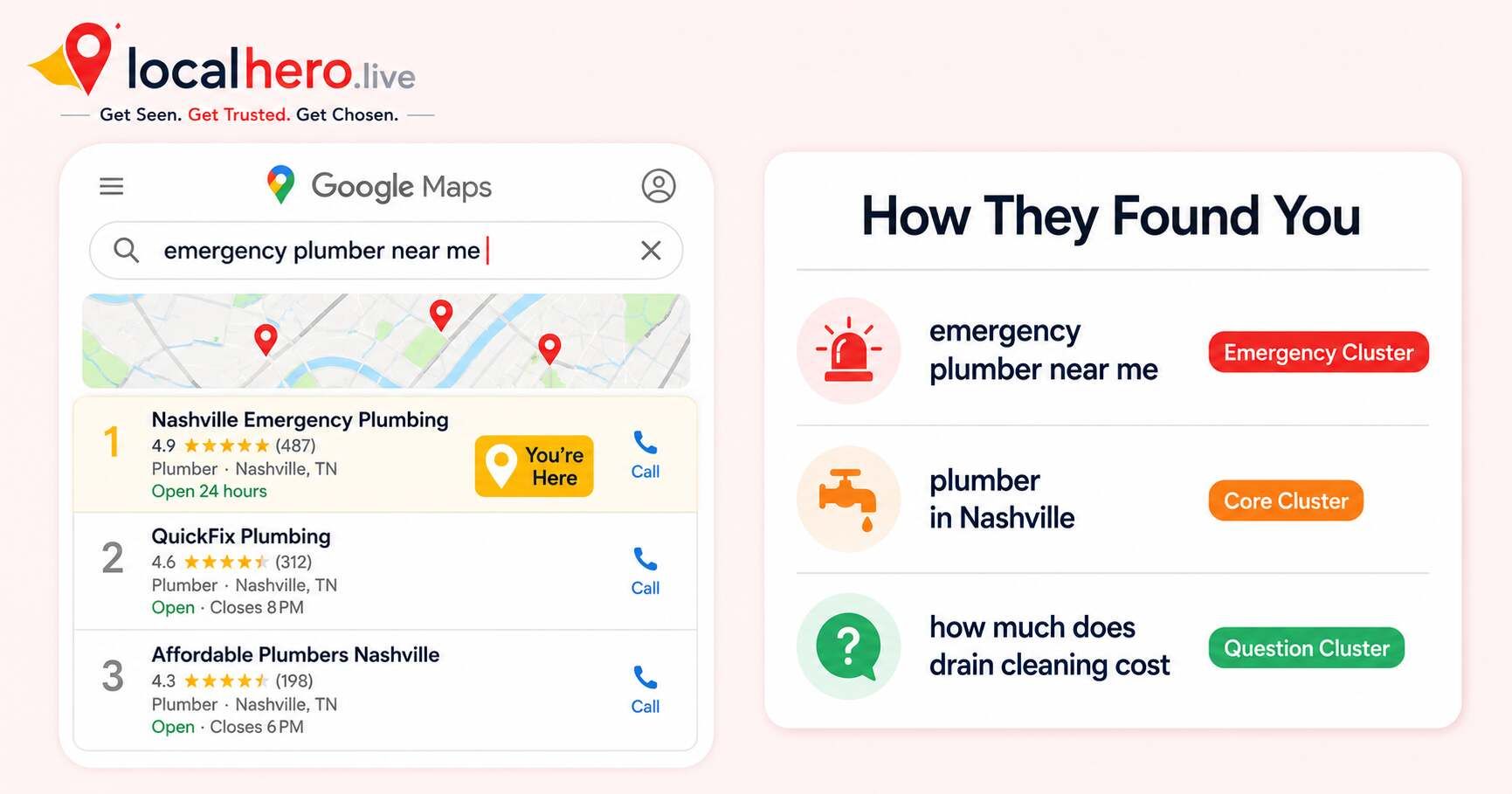
Most local business owners guess at their keywords. They type "[trade] near me" into their homepage and call it done. Then they wonder why competitors are showing up in Google Maps searches they never thought to target.
The problem is not that local keyword research is hard. It is that most business owners do not know there is a system behind it. Local search behavior follows predictable patterns. 46% of all Google searches have local intent and that is nearly 3.9 billion local searches every day. The business owners who understand how those searches break down consistently outrank those who do not.
This guide shows you exactly how to find local SEO keywords using a free, systematic method that works for any service trade and any city. No paid tools required.
Why Local Keywords Work Differently
Local keywords are not just regular keywords with a city name added. They carry a different type of intent and they convert at a dramatically higher rate than informational searches.
76% of people who search "near me" on mobile visit a business within 24 hours. A homeowner searching "emergency plumber near me" at 11 PM is not doing research. They have a burst pipe and are calling the first credible result they see.
Three things make local keyword research unique from standard SEO:
1. Google infers local intent without explicit local phrases. A search for "dentist" on a mobile device now triggers local results almost universally because Google reads the device location. By 2027, explicit "near me" phrasing is expected to be optional for over 60% of local-intent queries. This means you are competing for local keyword traffic even on terms that do not look obviously local.
2. Discovery searches dominate local traffic. 86% of Google Business Profile views come from discovery searches, not people searching your business name. They searched a category or service. Targeting the right service keywords captures this massive discovery traffic.
3. Most competitors are not doing this. 58% of companies still do not optimize for local search, every cluster you build is a gap they have left open.
For a full look at local search behavior data, see Local SEO Statistics 2026: 47 Data Points Every Service Business Should Know.
The 6 Local Keyword Clusters You Need
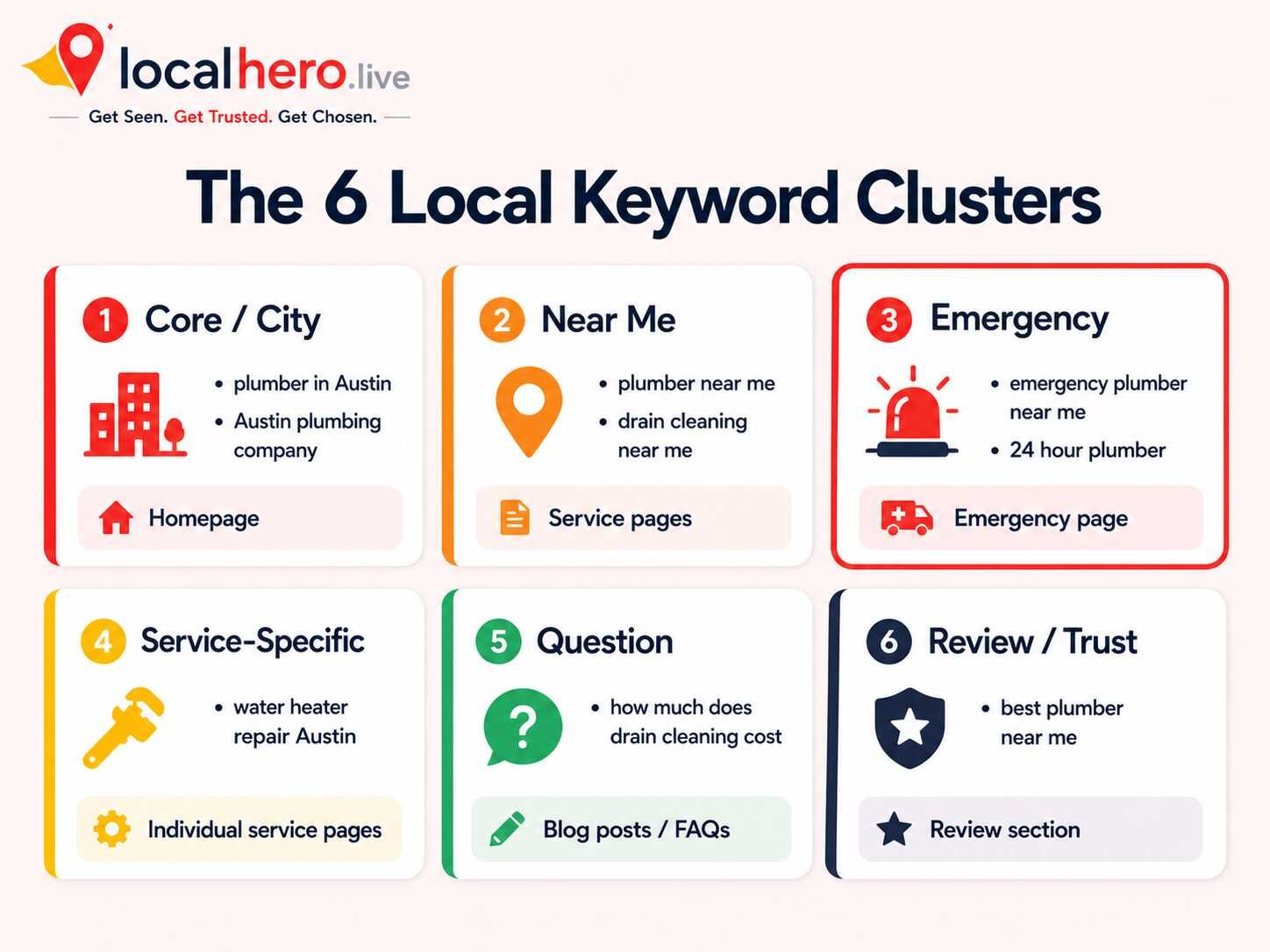
Local keywords fall into six distinct clusters based on searcher intent. Each cluster belongs in a different part of your online presence. This is keyword clustering, and it is the fastest way to go from a scattered keyword list to a focused local SEO strategy.
|
Cluster |
Examples |
Intent |
Where it belongs |
|---|---|---|---|
|
Core / City |
"plumber in Austin," "Austin plumbing company" |
Finding a local provider |
Homepage, title tags, GBP category |
|
Near Me |
"plumber near me," "drain cleaning near me" |
Ready to call now |
GBP description, service pages |
|
Emergency / Urgent |
"emergency plumber near me," "24 hour plumber" |
Crisis, call immediately |
Dedicated emergency page, GBP services |
|
Service-Specific |
"water heater repair Austin," "drain cleaning Austin" |
Looking for a specific service |
Individual service pages |
|
Question |
"why is my toilet running," "how much does drain cleaning cost" |
Researching before deciding |
Blog posts, FAQ sections |
|
Review / Trust |
"best plumber near me," "top rated plumber Austin" |
Validating before choosing |
Review section, testimonials page |
Why clusters matter: If you target all six types on a single homepage, you win none of them. Google ranks pages, not websites. Each cluster belongs on a specific page, matched to the intent of the person searching. Your homepage targets core and near-me keywords. Your emergency page targets urgent-intent keywords. Your blog targets question keywords. Your service pages each target one service-specific cluster.
This is exactly how the LocalHero local keyword generator organizes its output, 50+ keywords sorted by cluster, ready to assign to the right page.
How to Build Your Local Keyword List Step by Step
You can build a solid local keyword list in under an hour using free tools. Here is the exact process.
Step 1: Define Your Core Keyword Foundation
Your core keywords are your trade plus your city. Every other keyword you build branches from these.
Write out your core keyword in this format: [trade] + [city] and [city] + [trade]. These two variations are not identical in Google's eyes, both matter.
Examples for a plumbing company in Nashville:
-
"plumber in Nashville"
-
"Nashville plumber"
-
"Nashville plumbing company"
-
"plumbing services Nashville TN"
Then add your surrounding service areas. If you serve multiple cities, each city needs its own version of these core keywords, and eventually, its own dedicated service area page.
Pro tip: Do not stuff multiple cities into one page. Google cannot rank one page well for "plumber Nashville" and "plumber Brentwood" simultaneously. Create a separate service area page for each city you genuinely serve.
Step 2: Build Your Near-Me Keyword Variants
Near-me keywords drive the highest-converting traffic in local search. 200 million+ near-me searches happen every month in the US alone.
Near-me keywords follow a simple formula: [service] + near me or [trade] + near me.
Examples:
-
"plumber near me"
-
"drain cleaning near me"
-
"water heater repair near me"
-
"emergency plumber near me"
-
"plumbing company near me"
You do not need to include these on every page. Add the most relevant near-me variant to your homepage title tag and your most important service pages. Google matches them to local searchers automatically based on device location.
Step 3: Capture Emergency and High-Intent Keywords
Emergency keywords convert at a higher rate than almost any other search type. A person searching "emergency plumber near me" at midnight is not comparing options. They are calling the first number they see.
Build a dedicated emergency service page targeting:
-
"emergency [trade] near me"
-
"24 hour [trade]"
-
"[trade] open now"
-
"same day [service]"
This page must load fast, display your phone number above the fold, and make it clear you are available right now. Do not bury emergency availability on your homepage where a stressed customer might miss it.
Step 4: Build One Keyword Per Service Page
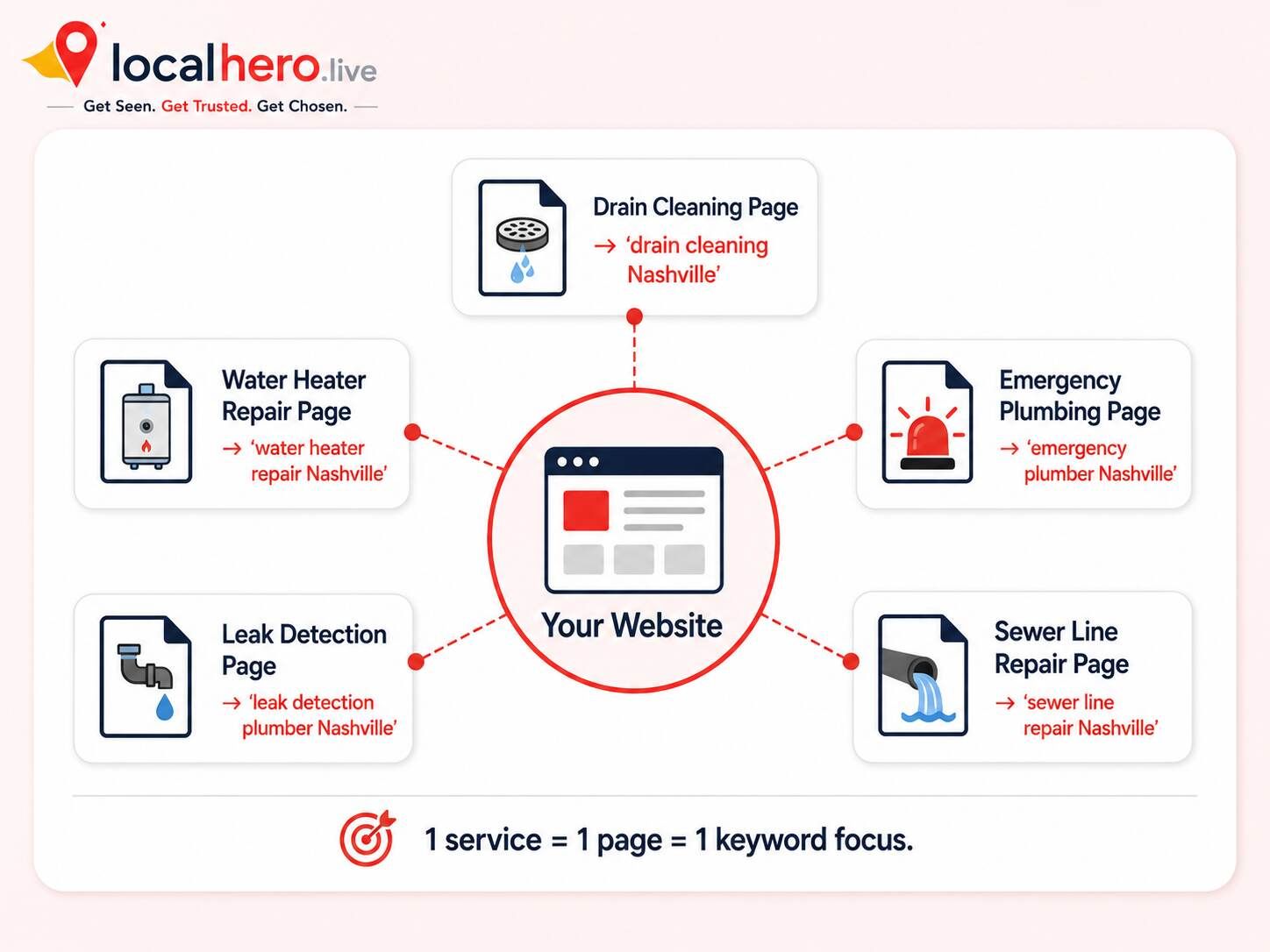
Service-specific keywords are where the real revenue comes from. A homeowner searching "water heater installation Nashville" has already decided they need a new water heater. They are choosing a provider, not doing research.
For each service you offer, build a keyword target in this format: [service] + [city].
|
Service |
Service-specific keyword target |
|---|---|
|
Drain cleaning |
"drain cleaning Nashville" |
|
Water heater repair |
"water heater repair Nashville" |
|
Sewer line repair |
"sewer line repair Nashville" |
|
Leak detection |
"leak detection plumber Nashville" |
|
Emergency plumbing |
"emergency plumber Nashville" |
Each service gets its own dedicated page on your website. Each page targets one service-specific keyword cluster. One page, one keyword focus. This is what allows Google to rank you for each specific search rather than competing against yourself.
For help building service pages that convert visitors to callers, see LocalHero's website speed and conversion optimization service.
Step 5: Mine Question Keywords for Blog Content
Question keywords are searches that start with "how," "why," "what," "when," or "how much." They represent people in the research phase, not yet ready to call, but moving toward a decision.
These keywords belong in blog posts and FAQ sections. They are not service-page keywords, but they build authority and capture traffic from potential customers who then find your core service pages.
Find question keywords by checking:
-
Google's "People Also Ask" box for your core keyword
-
The "Related searches" section at the bottom of results
-
Questions customers ask before booking
Examples: "How much does drain cleaning cost?" / "Why does my toilet keep running?" / "When should I replace my water heater?"
AI Overviews appear most often for informational searches, structured question content with FAQ schema markup gives you a chance to appear directly in AI-generated results.
Step 6: Add Review and Trust Keywords
Review keywords are searches like "best plumber near me" or "top rated HVAC company Nashville." These are mid-funnel searches from people who are close to a decision but still validating their choice.
They do not belong in title tags or H1s, but they belong naturally in your review response copy, your testimonials section, and your case study pages. When you respond to a positive review and write something like "We're so glad to be your go-to plumber in Nashville," you are naturally using a trust keyword.
Use LocalHero's Free Local SEO Keyword Generator
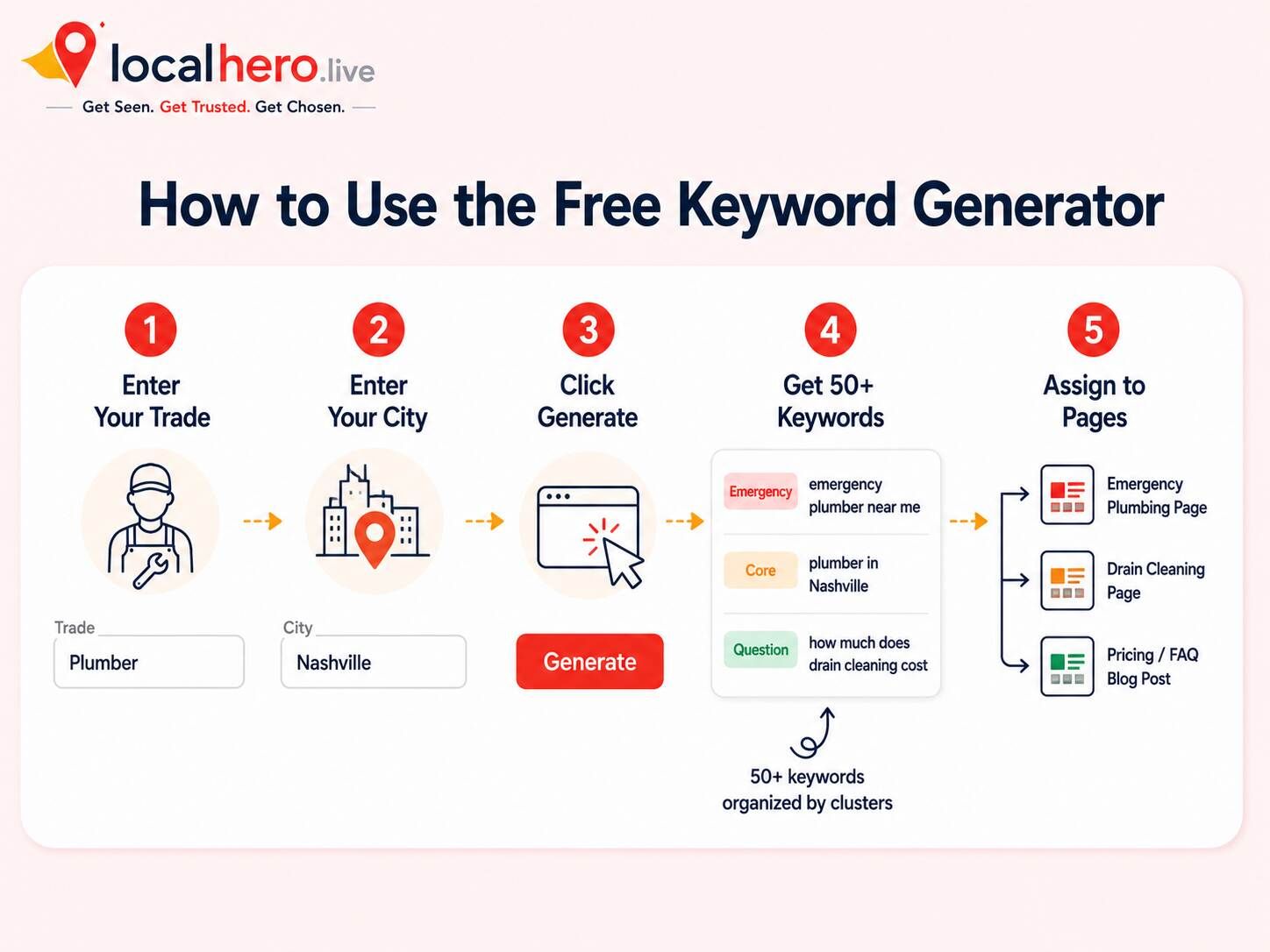
The fastest way to build all six clusters at once is with the free LocalHero local keyword generator.
Here is exactly how to use it:
-
Enter your trade, type your business type (plumber, HVAC, electrician, dentist, roofer, auto repair, attorney, cleaner, or any local service).
-
Enter your city, type the primary city you serve. Add your state if you want more specific results.
-
Click Generate. You get 50+ local SEO keywords instantly, organized by the six clusters above.
-
Copy your list, one-click copy, then paste into a spreadsheet.
-
Assign keywords to pages, use the cluster categories to map each keyword to the right page on your site.
No signup. No credit card. No limit on how many times you use it.
After generating your list, verify search volumes using Google's free Keyword Planner. The generator gives you the right keyword patterns, Keyword Planner confirms which ones get the most monthly searches in your specific market.
Where to Place Your Local Keywords
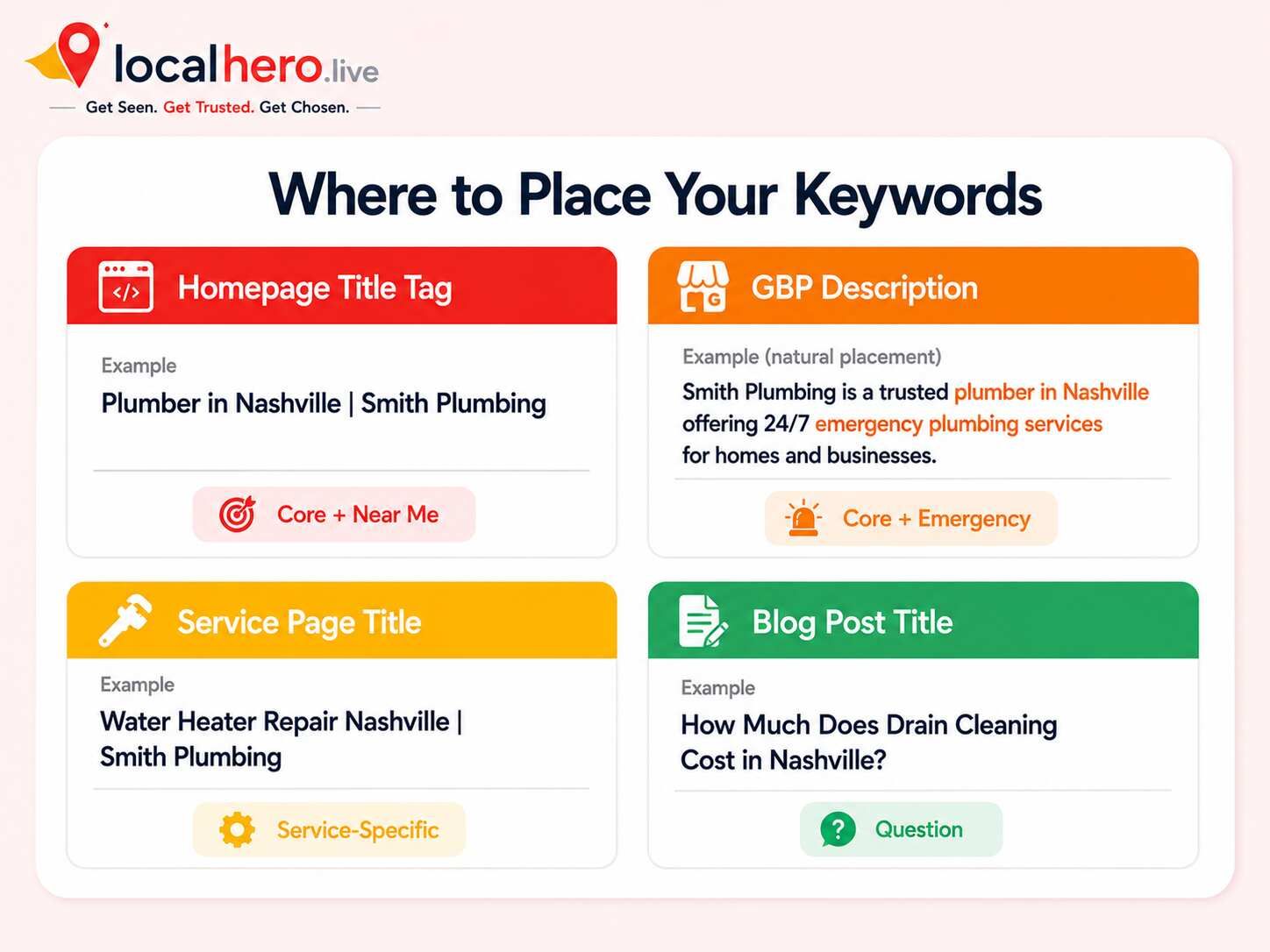
Knowing your keywords is half the work. Knowing exactly where to put them is what turns a keyword list into Map Pack rankings.
|
Location |
Which keyword cluster to use |
What to write |
|---|---|---|
|
Homepage title tag |
Core + Near Me |
"Plumber in Nashville |
|
Homepage H1 |
Core |
"Trusted Nashville Plumber Since 2010" |
|
GBP business description |
Core + Near Me + Emergency |
Use naturally, not as a keyword list |
|
GBP services section |
Service-Specific |
Each service as a separate entry |
|
Service page title tags |
Service-Specific |
"Water Heater Repair Nashville |
|
Blog post titles |
Question |
"How Much Does Drain Cleaning Cost in Nashville?" |
|
Meta descriptions |
Core + City |
Include city name and main service naturally |
|
Review responses |
Review / Trust |
"Thank you for choosing Nashville's top-rated plumber" |
Warning: Do not put the same keyword in the title tag, H1, meta description, first paragraph, and every subheading of the same page. Google reads this as keyword stuffing. Write for the reader first, the keyword fits naturally when the page is genuinely about that topic.
For a complete guide on how your keywords connect to your Google Business Profile and Map Pack rankings, see How to Show Up in Google's Map Pack: A Step-by-Step Guide and the Google Business Profile Checklist for Local Business.
How to Prioritize: Which Keywords Come First
You cannot build every page and target every cluster on day one. Here is the priority order that produces the fastest results.
Month 1, Fix the foundation:
-
Homepage targets your core keyword and city
-
GBP description includes your top 3 service keywords naturally
-
Every service listed in GBP using service-specific keyword phrasing
Month 2, Build high-value service pages:
-
Dedicated emergency page for urgent-intent keywords
-
Top revenue service page updated with service-specific keyword
-
FAQ sections added using question keywords
Month 3, Build out the full cluster:
-
Service area pages for each city you genuinely serve
-
2-3 question keywords turned into blog posts
-
Remaining service-specific pages built out
This sequence prioritizes the keywords most likely to produce calls quickly before investing in content that builds authority over time.
For the complete local SEO action plan that this keyword strategy feeds into, use the Local SEO Checklist for Small Businesses.
Common Keyword Mistakes Local Businesses Make
These are the errors that consistently prevent a solid keyword list from translating into actual rankings:
-
Targeting one keyword for the whole site. "Plumber Nashville" in every page title does not make Google rank your whole site for that term. It makes every page compete against itself.
-
Ignoring service-specific keywords. "Water heater installation Nashville" converts better than "plumber Nashville", and it has less competition.
-
Skipping the emergency cluster. Emergency searches are the most urgent and highest-converting in most service trades. A missing emergency page is direct revenue loss.
-
Using keywords without matching page content. Adding "drain cleaning Austin" to a page that says nothing about drain cleaning does not rank. Google reads the full page.
-
Targeting areas you do not serve. Listing keywords for cities you cannot realistically reach damages trust with potential customers and sends weak location signals.
-
Never revisiting the keyword list. Search behavior shifts. New services emerge. Competitors move in. Review and update your keyword strategy at least twice a year.
Checklist: Local SEO Keyword Research
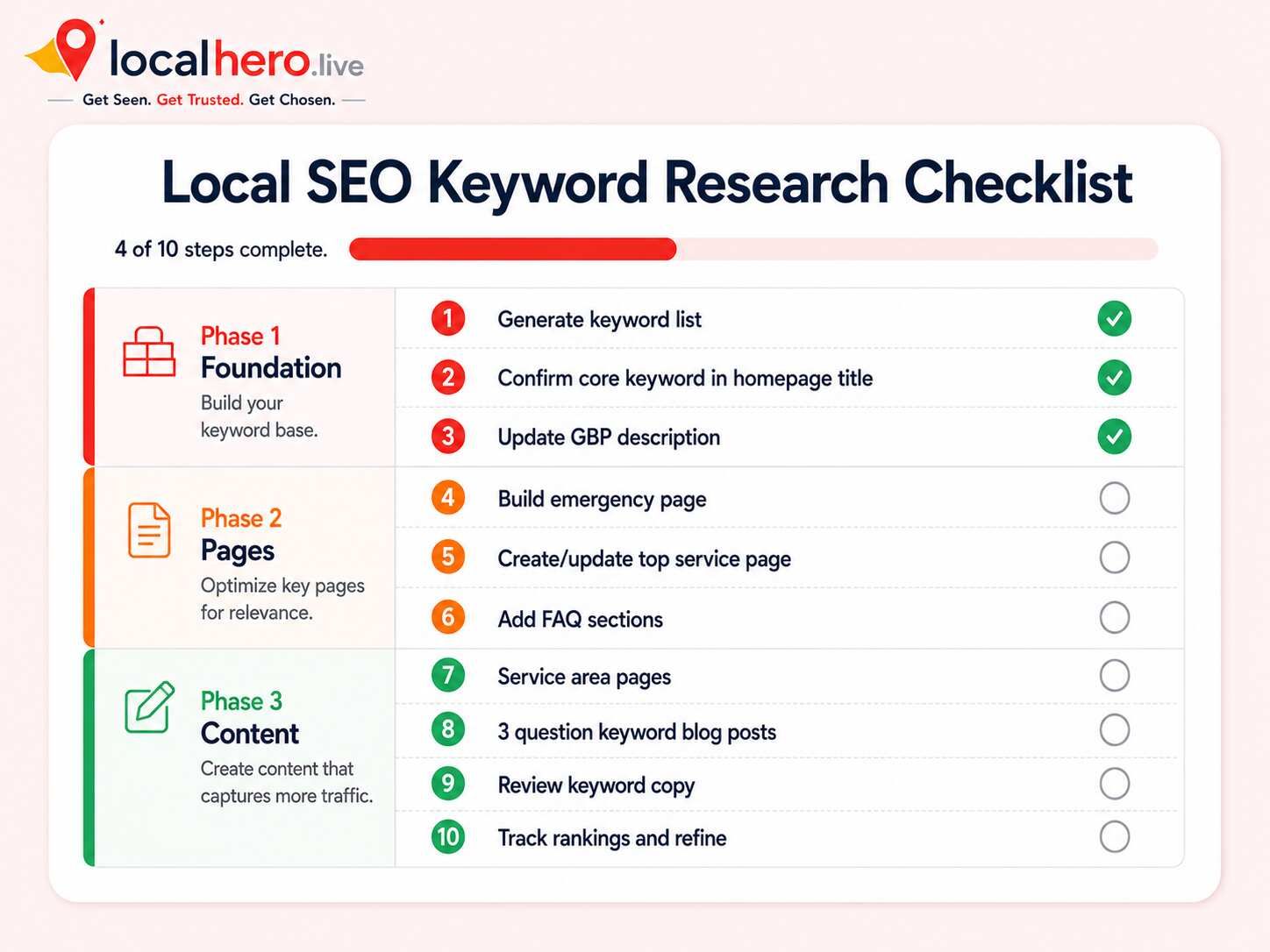
Use this checklist to confirm you have covered every cluster.
-
Enter your trade and city into the free LocalHero keyword generator and export your full list.
-
Identify your 2-3 core keywords and confirm they appear in your homepage title tag and H1.
-
Confirm your GBP description includes your core and near-me keywords naturally.
-
List every individual service in your GBP services section using service-specific keyword phrasing.
-
Verify your homepage title tag matches the format: "[Trade] in [City] | [Business Name]."
-
Build or update your emergency service page targeting your urgent-intent keyword cluster.
-
Create a dedicated service page for each high-revenue service, each targeting its own keyword.
-
Map 3-5 question keywords to blog post titles or FAQ sections.
-
Review your Google Business Profile, service pages, and homepage for keyword stuffing, each page should focus on one cluster.
-
Download the Local SEO Audit Checklist to track how your keywords connect to your broader local ranking signals.
-
Run a free local SEO audit to see how well your current pages align with your target keywords.
Find Your Local Keywords in 60 Seconds
The six-cluster keyword system in this guide is the same framework LocalHero uses for every client campaign, for plumbers in Phoenix, dentists in Dallas, and roofers in Atlanta.
Enter your trade and city into the free local SEO keyword generator. You get 50+ keywords organized by cluster, ready to assign to pages, no signup, no credit card.
LocalHero's local SEO services handle the full implementation: keyword targeting, service pages, GBP optimization, citations, and reviews.
Get your free keyword list at localhero.live/local-keyword-generator
Or get a free local SEO audit to see how well your current pages align with your target keywords.
Related reading
- Local Keyword Generator. Generate the list for your trade and city instantly.
- The 2026 Local SEO Checklist. Where the keywords go once you have them.
- Free Local SEO Audit. See which of them you already rank for.
Related reading
- Cleaning Company SEO. A worked example of keyword clusters split by buyer: house cleaning, maid service, commercial and specialist jobs.
Frequently Asked Questions
What is a local SEO keyword generator?
A local SEO keyword generator is a tool that takes your trade and city as inputs and outputs a list of local search terms your customers are likely to use when looking for your services. Good generators organize keywords by intent — core, near-me, emergency, service-specific, question, and review — so you can assign each keyword type to the right page on your website.
How do I find local SEO keywords for free?
The free method: enter your trade and city into LocalHero's local keyword generator to get 50+ organized local keywords instantly. Then use Google Keyword Planner (also free) to check search volumes for your market. For question keywords, look at Google's "People Also Ask" box and "Related searches" for your main keyword — both are free and updated in real time.
How many local keywords should I target per page?
Focus on one primary keyword cluster per page. That means 2–3 closely related keywords per page, not 10–15 scattered ones. Your homepage targets your core city keyword and a near-me variant. Each service page targets one service-specific keyword. Each blog post targets one question keyword. This focus is what allows Google to rank each page clearly for its specific search.
What is the difference between a local keyword and a regular keyword?
Local keywords carry geographic intent — either explicitly (a city name, "near me") or implicitly (Google detecting location from a mobile device). They target people actively seeking a business in a specific area rather than information from anywhere. Local keywords convert faster because the searcher is further along in their buying decision — they are looking for a provider, not general information.
How often should I update my local keyword strategy?
Review your keyword strategy at least every six months. Search behavior shifts, new services emerge, and competitors change their targeting. Check which pages are driving calls and which are not, then update underperforming pages with stronger keyword alignment. Run a new keyword generation cycle whenever you add a new service or expand to a new service area.
Md Shakil Jamal
Co-Founder | Digital Marketing Manager and DEV
Md Shakil Jamal is the co-founder of LocalHero and an SEO content strategist. He helps local businesses rank higher on Google, appear in AI search results, and turn online visibility into business growth. Connect with him on LinkedIn.
More local SEO playbooks
Ready to be the local hero in your city?
Get a free local SEO audit of your site, Google Business Profile, citations, and top three Map Pack competitors. You will see exactly where you can win in 30 seconds.
- No long term contracts
- No lock in
- Cancel anytime