Table of Contents
If you’re wondering how to claim your local business in ChatGPT, sign in to the official ChatGPT Business Hub and search for your business name. If the right location appears and you’re offered a claim, choose a verification method you can access. If the business is missing, your options depend on your business type and what the Hub shows your account.
OpenAI’s setup guide says local stores and restaurants can claim only an existing U.S. listing. If you visit customers, like a plumber or cleaner, start with the same search and check which options appear. Launch-week reports show that service businesses saw different options.
Eligibility and instructions checked November 12, 2026.
Can your local business claim a ChatGPT listing?
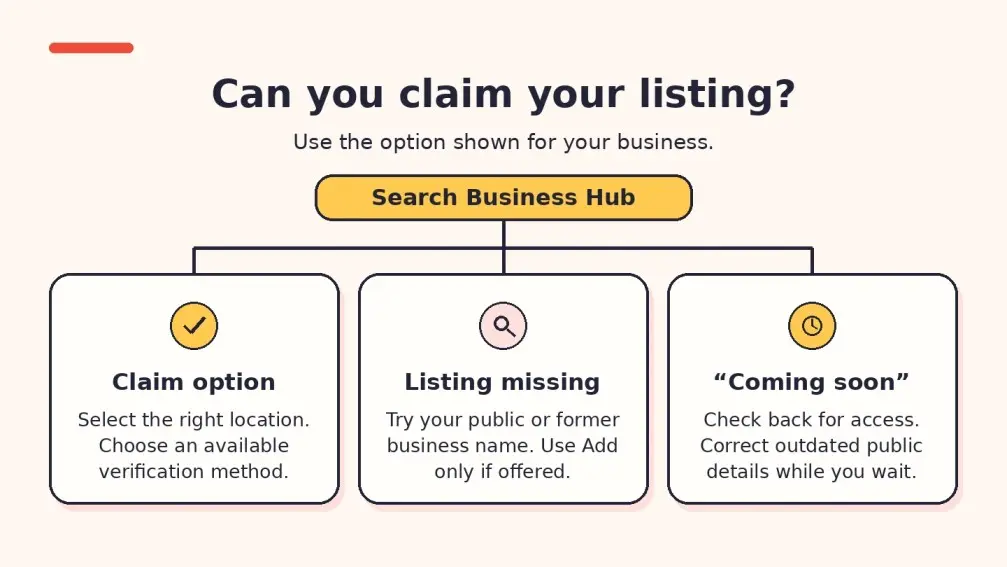
To see how to claim your local business in ChatGPT, check whether Business Hub offers a claim for your exact location. A mention in a ChatGPT answer can help you see what customers see. Search Business Hub to check whether you can claim the profile.
| Your situation | What to do |
|---|---|
| Your U.S. store or restaurant already has a listing | Match the name and address, then use the claim option and a verification method the Hub offers. |
| Your U.S. store or restaurant is missing | Try the public business name and any former name still in use online. OpenAI currently documents claims for existing U.S. listings for stores and restaurants. If yours is missing, check the public information customers can find. |
| You visit customers at their homes or offices | Search for an existing listing. If you see a claim or add option for your business type, follow the prompts. If the option says “Coming soon,” check back and correct any outdated details customers can see today. |
| You have more than one location | Check each branch by name and address. A claim for the main brand leaves branch claims separate. If your brand uses OpenAI’s managed claim process, ask your OpenAI account contact about locked locations. |
If customers visit your location, our Google Business Profile optimization service can help keep your public address, hours, and contact details accurate on Google Maps.
An Austin restaurant, dentist, or auto repair shop can search for its public location. A Fort Worth electrician who works on-site should describe how customers actually receive service. Use a public address only if customers visit that location.
If you visit customers and want to know how to claim your local business in ChatGPT, check what your account offers. On November 10, Flavio Copes’ launch walkthrough reported that the service option said “Coming soon.” In a separate U.S. account test that day, Verlua reported claiming existing listings for gutter, excavation, and tree service businesses and seeing an option to add a missing business. Those reports reflect individual accounts.
How to claim your local business in ChatGPT step by step
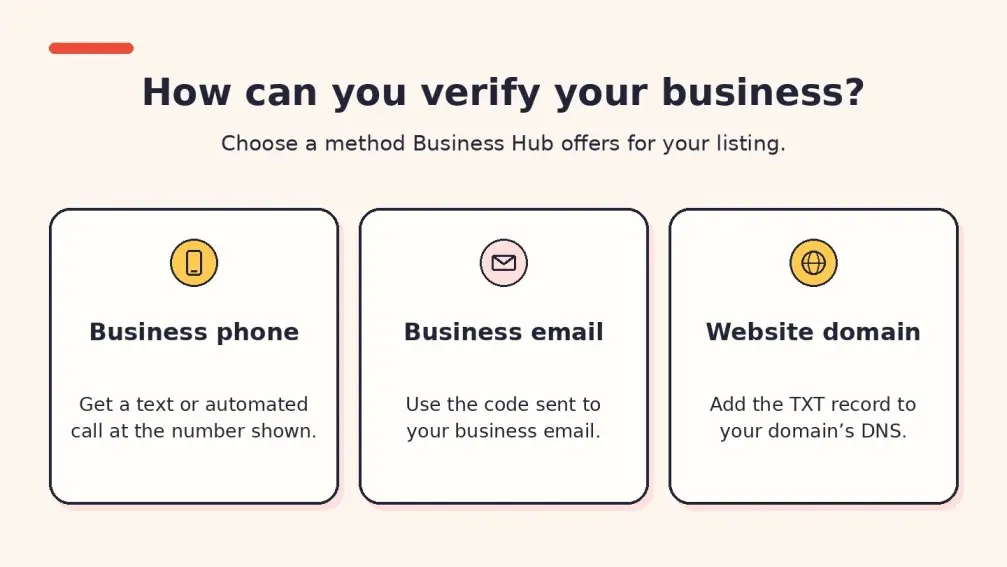
The standard path for an existing listing starts with proving your connection to the business. OpenAI reviews the claim, then Persona checks your identity before you can publish profile changes or see Insights. If the screens change, follow OpenAI’s guide on how to claim your local business in ChatGPT.
- Sign in and search Business Hub. Search by business name. If you received a personal claim invitation, open it and sign in with the email address that received it.
- Pick the right listing and account. Compare the address, phone number, and website when shown. If branches share a name, use the address to identify the right one. Confirm which ChatGPT account will manage the listing.
- Use a verification method offered for your listing. For phone verification, request a text or automated call at the number shown. For email, use the code sent to the address tied to the business. For domain verification, ask the person who manages your website domain to add the TXT record shown in the Hub. Once it’s visible, select Verify domain. OpenAI also documents Shopify verification when offered.
- Wait for the claim decision. Watch your email for approval or a request for more information. Review times vary. If you need to stop while a claim is under review, use Cancel claim where shown.
- Complete identity verification with Persona. Open your business in the Hub and follow the prompts. You may need a government ID, business registration details, or proof that you can act for the business. The verified badge appears after Persona approves the check. If your account offers a new-profile flow that uses Persona, review the details before submitting. OpenAI says approval publishes that new profile automatically.
- Review the public details. Once both checks are approved, open the profile and review the fields you can edit. Start with the website link, service category, and business description. If the phone number or hours are wrong, check where the error appears before choosing how to fix it.
Once you’ve checked your profile, our AI search optimization service can help you review how ChatGPT describes your services and which sources it cites.
What to do if your business is missing, locked, or already claimed
If you’re unsure how to claim your local business in ChatGPT after a search, match your screen to the next action below.
| What you see | What to do next |
|---|---|
| Business missing or service option says “Coming soon” | Search again using the public or former name. Use any add option only if it fits your business. If no path appears, check your website and public listings and revisit the Hub as access changes. |
| Contact support | The profile is locked. Use that button to ask about access. |
| Someone already claimed your business | Open the profile menu and choose Dispute ownership. Follow Persona’s instructions to prove you can represent the business. |
| The wrong branch comes up | Go back and check the street address and website for your branch. |
| The phone or email shown is out of date | Try another offered method you control. If none works, contact OpenAI Support with the step, error, and a screenshot with private details removed. |
| Claim or Persona check is pending | Wait for the decision or request for more details by email before retrying. |
| Persona check failed or expired | Follow the email instructions. If you see Try again, use it and match your details to official records. Contact Support if you can’t retry or the status still shows incomplete after approval. |
If you also find outdated phone numbers or duplicate listings in public directories, our citation cleanup service can help correct those records.
How to fix inaccurate business information while you wait
While you work out how to claim your local business in ChatGPT, check the source of any wrong detail. If ChatGPT gives customers the wrong phone number, open the sources linked in the answer and look for that number. If the answer gives no source for the detail, search the web for the exact number or wording alongside your business name. Save the pages where you find the error.
Example: A plumber’s old directory listing shows the wrong service area
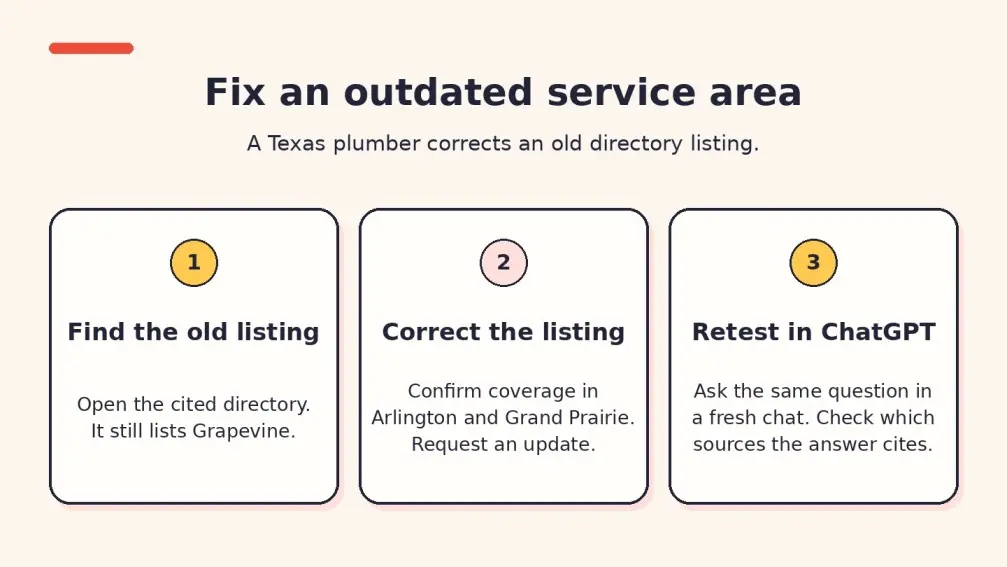
Illustrative example. An Arlington plumber stops taking jobs in Grapevine but still works in Arlington and Grand Prairie. A customer asks ChatGPT about Grapevine, and the answer points to a directory that still lists the old coverage area.
- Open the cited directory page. Save its URL and copy the exact wording about Grapevine.
- Confirm where the crew works today. Ask dispatch to check the current coverage list. Compare it with the service area page and Google Business Profile.
- Request the correction. Use the directory’s edit or support option. Include the listing URL, the correct cities, and the website page that confirms the change. If the website is also out of date, fix it first.
- Retest the same question. Once the directory page updates, open a fresh chat and repeat the question. Record the date, answer, and sources. If Grapevine still appears, check whether another cited page repeats the error.
Replace the bracketed text. Run each check in a separate chat and reuse the wording when you retest.
- Services: “What plumbing services does [business name] offer in Arlington, Texas? Cite your sources.”
- Coverage: “Does [business name] take plumbing jobs in Grapevine, Texas? Cite the source for its service area.”
- Local discovery: “Which plumbers serve Grand Prairie, Texas, and offer water heater repair? Cite your sources.”
Where to check your details
- Service and location pages. List what you do, where you work, when customers can reach you, and how to call or request a quote.
- Google Business Profile and Google Maps. Check the public phone number, hours, website, and address or service area. Google Business Profile and Business Hub are separate. OpenAI hasn’t documented an automatic link between edits in Google and updates in Business Hub.
- Local directories. Check cited pages first, then trade associations, chamber listings, and directories customers use. See how LocalHero’s citation cleanup service handles mismatched details.
- Website access. Ask your webmaster to check robots.txt and firewall access for OAI-SearchBot. OpenAI uses it for ChatGPT Search. Allowing access helps make pages eligible to appear.
Once you’ve checked how to claim your local business in ChatGPT, use the local SEO checklist for small businesses to work through website, map, and directory checks together.
What to check after your claim is approved
After following the steps on how to claim your local business in ChatGPT, wait for Persona approval before editing your profile. OpenAI lists the website, description, product or service category, logo, cover photo, and some optional details. For phone, hours, address, or service area, check what your profile lets you edit. If the public profile is wrong and there’s no matching field, contact Support with the affected location and details. If the error is in an answer, check its sources too. OpenAI reviews edits, and answers may use information from other sources.
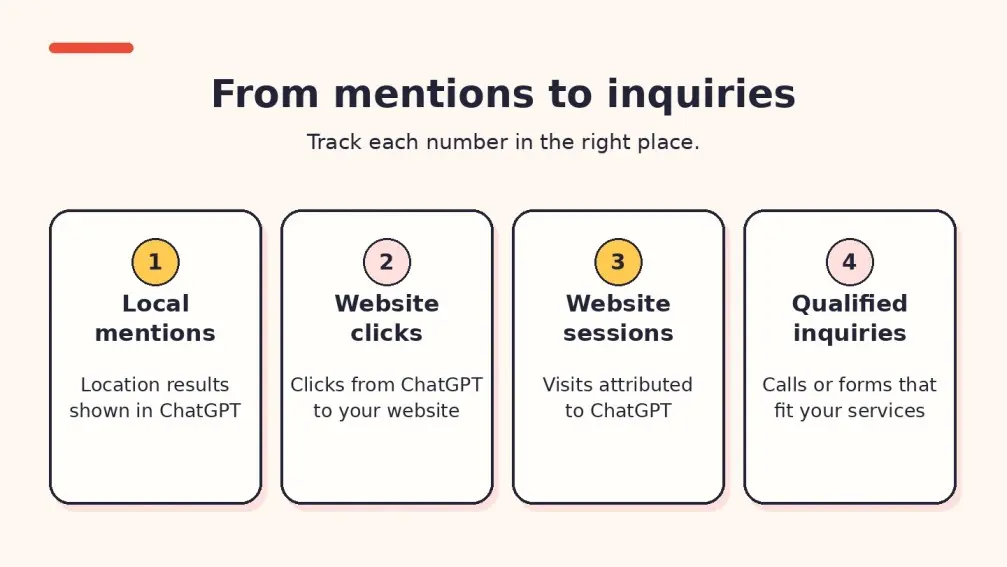
If you’re learning how to claim your local business in ChatGPT to track visibility, open Insights after verification. A local mention counts when ChatGPT displays a result for your location, even if nobody opens the listing. Discovery topics, where available, show broad themes in answers that included your business. Use them to spot services worth checking on your site.
| Number to track | Where to find it | What to record |
|---|---|---|
| Local mentions | Business Hub Insights | How often ChatGPT showed a result for the location. |
| Website clicks | Business Hub Insights | How often users clicked through to your site. |
| Website sessions | GA4 or your website analytics | Visits attributed to ChatGPT where identifiable, plus the landing page. |
| Qualified calls or forms | Call logs, confirmed forms, or your CRM | Real inquiries that match your services and area. Record the source when you have evidence. |
If people reach your site but struggle to call or request a quote, our website speed and conversion service can help make those steps easier on mobile.
Use the same date range and location for each check. A blank Insights metric can mean too little activity to report, ongoing data collection, or unavailable reporting. Keep it blank in your notes and ask Support if it stays that way. If someone calls after seeing your number in ChatGPT without visiting the site, your website analytics may miss the source. Ask callers where they found you and record their answer when they know.
Get a free local SEO audit
If checking how to claim your local business in ChatGPT uncovered conflicting website, Maps, or directory details, start with the page customers are most likely to visit. Enter its URL in the free LocalHero SEO audit to check public signals such as your phone number, hours, service area, and page setup. Add your business name and city to unlock available Google Business Profile checks.
Frequently Asked Questions
How to claim your local business in ChatGPT if you visit customers
Search Business Hub and follow any claim or add option it offers for your business type. Access has varied in reported tests. If the service option says “Coming soon,” check again as the rollout changes.
Why does my business show up in ChatGPT but not in Business Hub?
ChatGPT can use other sources when it answers. A mention or link in a chat may come from your website or another public page. Check the sources in that answer and search for your exact business name in the Hub.
How to claim your local business in ChatGPT if you have multiple locations
OpenAI says central management across a parent company’s brands and locations is currently unavailable. Check each branch. If your company uses a managed claim process, ask your OpenAI account contact about location access.
Can my local SEO agency help manage my listing?
Yes. If you need help with how to claim your local business in ChatGPT, the admin who claimed the business can grant agency access. Each person uses their own ChatGPT account. Some workspace claims may require invitees to join the workspace.
Will claiming make ChatGPT recommend my business more often?
Claiming lets you manage the details you provide once verification is complete. OpenAI gives no guarantee of more recommendations or higher visibility.
Do I need a paid ChatGPT Business plan or an ads account?
Start by signing in to Business Hub. OpenAI’s published claim requirements focus on eligibility, authorization, and verification. An ads account or Enterprise agreement is unnecessary for an eligible claim.
Manal Ghamir
Co-Founder | Sales and Content Creator
Manal Ghamir is an SEO writer and co-founder of LocalHero. She helps brands and local service businesses create answer-first content that ranks on Google, appears in AI answers, and turns search visibility into leads. Connect with her on LinkedIn.
More local SEO playbooks
Ready to be the local hero in your city?
Get a free local SEO audit of your site, Google Business Profile, citations, and top three Map Pack competitors. You will see exactly where you can win in 30 seconds.
- No long term contracts
- No lock in
- Cancel anytime